Monthly Archives: March 2013
Moving system databases to the default data and log paths
Recently I had to assess and tune quite a lot of SQL Server instances and one the things that are often overlooked is the location of the system databases.
I often see instance where the system databases are located in the system drives under the SQL Server default installation path, which is bad for many reasons, especially for tempdb.
I had to move the system databases so many times that I ended up coding a script to automate the process.
The script finds all system databases that are not sitting in the default data and log paths and issues the ALTER DATABASE statements needed to move the files to the default paths.
Obviously, to let the script work, the default data and log paths must have been set in the instance properties:

You may also point out that moving all system databases to the default data and log paths is not always a good idea. And you would be right: for instance, if possible, the tempdb database should be working on a fast dedicated disk. However, very often I find myself dealing with low-end servers where separate data and log disks are a luxury, not to mention a dedicated tempdb disk. If you are concerned about moving tempd to the default data and log paths, you can modify the script accordingly.
-- =============================================
-- Author:      Gianluca Sartori - spaghettidba
-- Create date: 2013-03-22
-- Description: Moves the system databases to the
--              default data and log paths and
--              updates SQL Server startup params
--              accordingly.
-- =============================================
SET NOCOUNT ON;

USE master;

-- Find default data and log paths
-- reading from the registry

DECLARE @defaultDataLocation nvarchar(4000)
DECLARE @defaultLogLocation nvarchar(4000)

EXEC master.dbo.xp_instance_regread
    N'HKEY_LOCAL_MACHINE',
    N'Software\Microsoft\MSSQLServer\MSSQLServer',
    N'DefaultData',
    @defaultDataLocation OUTPUT

EXEC master.dbo.xp_instance_regread
    N'HKEY_LOCAL_MACHINE',
    N'Software\Microsoft\MSSQLServer\MSSQLServer',
    N'DefaultLog',
    @defaultLogLocation OUTPUT

-- Loop through all system databases
-- and move to the default data and log paths

DECLARE @sql nvarchar(max)

DECLARE stmts CURSOR STATIC LOCAL FORWARD_ONLY
FOR
SELECT
    ' ALTER DATABASE '+ DB_NAME(database_id) +
    ' MODIFY FILE ( ' +
    '     NAME = '''+ name +''', ' +
    '     FILENAME = '''+
    CASE type_desc
        WHEN 'ROWS' THEN @defaultDataLocation
        ELSE @defaultLogLocation
    END +
    '\'+ RIGHT(physical_name,CHARINDEX('\',REVERSE(physical_name),1)-1) +'''' +
    ' )'
FROM sys.master_files
WHERE DB_NAME(database_id) IN ('master','model','msdb','tempdb')
    AND (
        physical_name NOT LIKE @defaultDataLocation + '%'
        OR physical_name NOT LIKE @defaultLogLocation + '%'
    )

OPEN stmts
FETCH NEXT FROM stmts INTO @sql

WHILE @@FETCH_STATUS = 0
BEGIN

    PRINT @sql
    EXEC(@sql)

    FETCH NEXT FROM stmts INTO @sql
END

CLOSE stmts
DEALLOCATE stmts

-- Update SQL Server startup parameters
-- to reflect the new master data and log
-- files locations

DECLARE @val nvarchar(500)
DECLARE @key nvarchar(100)

DECLARE @regvalues TABLE (
    parameter nvarchar(100),
    value nvarchar(500)
)

INSERT @regvalues
EXEC master.dbo.xp_instance_regenumvalues
        N'HKEY_LOCAL_MACHINE',
        N'SOFTWARE\Microsoft\MSSQLServer\MSSQLServer\Parameters'

DECLARE reg CURSOR STATIC LOCAL FORWARD_ONLY
FOR
SELECT *
FROM @regvalues
WHERE value LIKE '-d%'
    OR value LIKE '-l%'

OPEN reg

FETCH NEXT FROM reg INTO @key, @val

WHILE @@FETCH_STATUS = 0
BEGIN

    IF @val LIKE '-d%'
        SET @val = '-d' + (
            SELECT physical_name
            FROM sys.master_files
            WHERE DB_NAME(database_id) = 'master'
                AND type_desc = 'ROWS'
        )
    IF @val LIKE '-l%'
        SET @val = '-l' + (
            SELECT physical_name
            FROM sys.master_files
            WHERE DB_NAME(database_id) = 'master'
                AND type_desc = 'LOG'
        )

    EXEC master.dbo.xp_instance_regwrite
        N'HKEY_LOCAL_MACHINE',
        N'SOFTWARE\Microsoft\MSSQLServer\MSSQLServer\Parameters',
        @key,
        N'REG_SZ',
        @val

    FETCH NEXT FROM reg INTO @key, @val

END

CLOSE reg
DEALLOCATE reg
After running this script, you can shut down the SQL Server service and move the data and log files to the appropriate locations.
When the files are ready, you can bring SQL Server back online.
BE CAREFUL! Before running this script against a clustered instance, check what the xp_instance_regread commands return: I have seen cases with SQL Server not reading from the appropriate keys.
Data Collector Clustering Woes
During the last few days I’ve been struggling to work around something that seems to be a bug in SQL Server 2008 R2 Data Collector in a clustered environment. It’s been quite a struggle, so I decided to post my findings and my resolution, hoping I didn’t contend in vain.
SYMPTOMS:
After setting up a Utility Control Point, I started to enroll my instances to the UCP and everything was looking fine.

When an instance is enrolled to a UCP, the sysutility_mdw database can be used as a target Management Datawarehouse for non-utility collection sets, such as the built-in system collection sets. Actually, the utility database is the only possible target for any collection set, since the data collection configuration is shared between utility and non-utility collection sets.
That said, I enabled and started the system collection sets and eagerly waited for some data to show up on the built-in reports. As nothing turned up, I checked the data collector jobs and they were executing successfully, so the data had to be there, hidden somewhere.
In fact, the data had been collected and uploaded successfully, but it didn’t show up in the reports because of the way the data source had been registered in the Management Datawarehouse internal tables.
A quick look at [core].[source_info_internal] unveiled the root cause of the issue: the clustered instances had been registered with the physical name of the cluster node and not with the virtual server name of the instance.

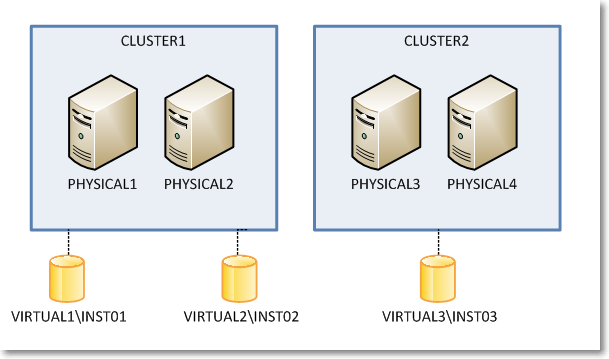
The built-in Data Collector reports filter data in this table using the server name connected in SSMS, which is obviously very different from what found in the data sources table. For instance, when connected to the clustered instance VIRTUAL1\INST01, I didn’t see any performance data showing in the report because the data had been collected using the physical network name of the owner node (eg. PHYSICAL1\INST01).
I know it may sound confusing at this point, so keep the following picture in mind while looking at servers and instances in the example.
So, what was wrong with my setup? How could it be fixed?
I tried everything that came to my mind to no avail. In order, I tried:
- Wiping out the datawarehouse database (sysutility_mdw)
- Reinstalling the instance hosting the datawarehouse
- Changing the upload jobs (this one looked promising, because some job steps contained the $(MACH)\$(INST) tokens instead of the $(SRVR) token I would have expected, but it didn’t work either)
- Updating data in the tables directly
Nothing I tried solved the issue: every time the upload jobs ran at the enrolled instances, the wrong instance names turned up in the data sources table.
I suspect something was wrong in the Management Datawarehouse instance, since the same issue affected all the enrolled instances, no matter where they were installed. Question is I was unable to find a way to make it work.
The only thing that worked for me was forcing SQL Server to understand what my cluster setup looks like and preventing it from using cluster node names instead of virtual instance names.
As ugly as it can be, the only fix that worked was a view + INSTEAD OF TRIGGER combination.
First of all we need some tables to store the cluster layout, with nodes and instances.
-- Create a couple of tables in msdb to
-- describe the cluster topology
USE msdb;
GO

CREATE TABLE sysutility_ucp_managed_cluster_nodes (
    cluster_id int NOT NULL,
    node_name sysname NOT NULL PRIMARY KEY CLUSTERED
)
GO

CREATE TABLE sysutility_ucp_managed_cluster_servers (
    cluster_id int NOT NULL,
    virtual_server_name sysname NOT NULL PRIMARY KEY CLUSTERED,
    instance_name sysname NULL,
    server_name AS virtual_server_name + ISNULL('\' + NULLIF(instance_name,'MSSQLSERVER'),'')
)
GO

INSERT INTO sysutility_ucp_managed_cluster_nodes (cluster_id, node_name)
VALUES	(1,'PHYSICAL1'),
        (1,'PHYSICAL2'),
        (2,'PHYSICAL3'),
        (2,'PHYSICAL4')
GO

INSERT INTO sysutility_ucp_managed_cluster_servers (cluster_id, virtual_server_name, instance_name)
VALUES	(1,'VIRTUAL1','INST01'),
        (1,'VIRTUAL2','INST02'),
        (2,'VIRTUAL3','INST03')

GO

GRANT SELECT ON object::sysutility_ucp_managed_cluster_nodes TO [dc_proxy];
GRANT SELECT ON object::sysutility_ucp_managed_cluster_servers TO [dc_proxy];
Then we need to update the data sources collected using the cluster node name instead of the virtual name:
USE [sysutility_mdw]
GO

UPDATE trg
SET trg.instance_name = REPLACE(trg.instance_name COLLATE database_default, nodes.node_name + '\', srv.virtual_server_name + '\')
FROM [core].[source_info_internal] AS trg
INNER JOIN msdb.dbo.sysutility_ucp_managed_cluster_nodes AS nodes
    ON nodes.node_name = SUBSTRING(trg.instance_name, 1, LEN(nodes.node_name)) COLLATE database_default
INNER JOIN msdb.dbo.sysutility_ucp_managed_cluster_servers AS srv
    ON nodes.cluster_id = srv.cluster_id

-- Now server names should be ok
SELECT *
FROM sysutility_mdw.[core].[source_info_internal]
GO
Now we will replace the data sources table with a view that multiplies virtual server names for each possible owner node. This is required because the collection sets keep trying to upload data using the cluster node name and they fail miserably when the data source is not found in the table (“the specified collection set is not valid in this data warehouse”)
USE [sysutility_mdw]
GO

-- Rename the data sources table
EXEC sp_rename 'core.source_info_internal', 'source_info_internal_ms'

USE [sysutility_mdw]
GO

SET ANSI_NULLS ON
GO

SET QUOTED_IDENTIFIER ON
GO

CREATE VIEW [core].[source_info_internal]
AS
SELECT sii.source_id
    ,sii.collection_set_uid
    ,instance_name = (nds.node_name + ISNULL('\' + NULLIF(srv.instance_name,'MSSQLSERVER'),'')) COLLATE Latin1_General_CI_AI
    ,sii.days_until_expiration
    ,sii.operator
FROM core.source_info_internal_ms AS sii
INNER JOIN msdb.dbo.sysutility_ucp_managed_cluster_servers AS srv
    ON sii.instance_name COLLATE database_default = srv.server_name
INNER JOIN msdb.dbo.sysutility_ucp_managed_cluster_nodes AS nds
    ON nds.cluster_id = srv.cluster_id
UNION ALL
SELECT *
FROM core.source_info_internal_ms

GO
And now the last thing we need to create is a trigger on the view, in order to control what gets written to the original table.
With this in place, we should have only “good” server names showing up in the instance_name column.
CREATE TRIGGER [core].[TR_source_info_internal_IU]
ON [core].[source_info_internal]
INSTEAD OF INSERT, UPDATE, DELETE
AS
BEGIN
    SET NOCOUNT ON;

    -- Update rows using the source_id
    UPDATE trg
    SET days_until_expiration = i.days_until_expiration
    FROM core.source_info_internal_ms AS trg
    INNER JOIN inserted AS i
        ON trg.source_id = i.source_id
    WHERE EXISTS (
        SELECT 1
        FROM deleted
        WHERE source_id = i.source_id
    )

    -- Turn INSERTs into UPDATEs using the
    -- cluster physical / virtual conversion
    UPDATE trg
    SET days_until_expiration = i.days_until_expiration
    FROM core.source_info_internal_ms AS trg
    INNER JOIN msdb.dbo.sysutility_ucp_managed_cluster_servers AS srv
        ON srv.server_name = trg.instance_name COLLATE database_default
    INNER JOIN msdb.dbo.sysutility_ucp_managed_cluster_nodes AS nodes
        ON nodes.cluster_id = srv.cluster_id
    INNER JOIN inserted AS i
        ON  trg.collection_set_uid = i.collection_set_uid
        AND trg.operator = i.operator
        AND nodes.node_name + ISNULL('\' + NULLIF(srv.instance_name,'MSSQLSERVER'),'') = i.instance_name COLLATE database_default
    WHERE NOT EXISTS (
        SELECT 1
        FROM deleted
        WHERE source_id = i.source_id
    )

    -- Handle proper INSERTs
    ;WITH newrows AS (
        SELECT collection_set_uid, v_server.instance_name, days_until_expiration, operator
        FROM inserted AS i
        CROSS APPLY (
            SELECT instance_name = COALESCE((
                    SELECT srv.server_name
                    FROM msdb.dbo.sysutility_ucp_managed_cluster_servers AS srv
                    INNER JOIN msdb.dbo.sysutility_ucp_managed_cluster_nodes AS nodes
                        ON nodes.cluster_id = srv.cluster_id
                    WHERE srv.server_name = i.instance_name COLLATE database_default
                ),(
                    SELECT srv.server_name
                    FROM msdb.dbo.sysutility_ucp_managed_cluster_servers AS srv
                    INNER JOIN msdb.dbo.sysutility_ucp_managed_cluster_nodes AS nodes
                        ON nodes.cluster_id = srv.cluster_id
                    WHERE nodes.node_name + ISNULL('\' + NULLIF(srv.instance_name,'MSSQLSERVER'),'') = i.instance_name COLLATE database_default
                ), (
                    SELECT i.instance_name COLLATE database_default
                )
            ) -- end coalesce
        ) AS v_server
        WHERE NOT EXISTS (
                SELECT 1
                FROM deleted
                WHERE source_id = i.source_id
            )
    )
    INSERT INTO core.source_info_internal_ms (collection_set_uid, instance_name, days_until_expiration, operator)
    SELECT collection_set_uid, instance_name, days_until_expiration, operator
    FROM newrows
    WHERE NOT EXISTS (
        SELECT 1
        FROM core.source_info_internal_ms
        WHERE collection_set_uid = newrows.collection_set_uid
            AND instance_name = newrows.instance_name
            AND operator = newrows.operator
    )

    DELETE trg
    FROM core.source_info_internal_ms AS trg
    WHERE EXISTS (
            SELECT 1
            FROM deleted
            WHERE source_id = trg.source_id
        )
        AND NOT EXISTS (
            SELECT 1
            FROM inserted
            WHERE source_id = trg.source_id
        )

END
Obviously I don’t have access to the source code of the Data Collector, but I suspect it uses a component which is not cluster-aware (dcexec.exe) and for some reason it ends up using the wrong IP address to communicate with the management datawarehouse. I have nothing to support my supposition: it only seems reasonable to me and it resembles something I experienced in the past with non-cluster-aware services, such as the SQL Browser.
Is this a bug? Definitely!
Should I report it on Connect? Maybe: the results with past items are so discouraging that I don’t think I’ll bother taking the time to file it. It must be said that reproducing this error is not easy: any other failover cluster instance I have laying around was not affected by this issue, so I guess it’s an edge case. Nevertheless, worth fixing.
UPDATE 15 sept 2016:
Turns out that the whole problem arises ONLY when a proxy account runs the data collection job steps. If the job steps are run impersonating the SQL Server Agent account, the error doesn’t turn up. I suggest this solution rather than the complicated view/trigger solution proposed here.


 spaghettidba