Category Archives: SQL Server
Setting up an e-mail alert for DBCC CHECKDB errors
Some months ago I posted a script on a SQLServerCentral forum to help a member automating the execution of DBCC CHECKDB and send and e-mail alert in case a consistency error is found.
The original thread can be found here.
I noticed that many people are actually using that script and I also got some useful feedback on the code itself, so I decided to write this post to make an enhanced version available to everyone.
The Problem
Your primary responsibility as a DBA is to safeguard your data with backups. I mean intact backups! Keep in mind that when you back up a corrupt database, you will also restore a corrupt database.
A task that checks the database integrity should be part of your backup strategy and you should be notified immediately when corruption is found.
Unfortunately, the built-in consistency check Maintenance Task does not provide an alerting feature and you have to code it yourself.
The Solution
SQL Server 2000 and above accept the “WITH TABLERESULTS” option for most DBCC commands to output the messages as a result set. Those results can be saved to a table and processed to identify messages generated by corrupt data and raise an alert.
If you don’t know how to discover the resultset definition of DBCC CHECKDB WITH TABLERESULTS, I suggest that you take a look at this post.
Here is the complete code of the stored procedure I am using on my production databases:
| -- https://spaghettidba.com/2011/11/28/email-alert-dbcc-checkdb/ | |
| -- You have a TOOLS database, don't you? | |
| -- If not, create it: you'll thank me later. | |
| USE TOOLS; | |
| GO | |
| IF NOT EXISTS( SELECT 1 FROM sys.schemas WHERE name = 'maint') | |
| EXEC('CREATE SCHEMA maint'); | |
| GO | |
| -- ============================================= | |
| -- Author: Gianluca Sartori - spaghettidba | |
| -- Create date: 2011-06-30 | |
| -- Description: Runs DBCC CHECKDB on the database(s) specified | |
| -- and returns a table result that can be used in | |
| -- reporting and alerting. | |
| -- ============================================= | |
| CREATE PROCEDURE [maint].[dba_runCHECKDB] | |
| @dbName nvarchar(max) = NULL, -- Database name. If NULL, will check all databases | |
| @PHYSICAL_ONLY bit = 0, -- Set to 1 to perform physical check only. Defaults to 0. | |
| @allMessages bit = 0, -- Set to 1 to return all the messages generated by DBCC | |
| -- Set to 0 to return one summary message for each database (default) | |
| @dbmail_profile sysname = NULL, -- DBMail profile to use when sending the results | |
| @dbmail_recipient sysname = NULL, -- DBMail recipient | |
| @log_to_table bit = 0, -- Set to 1 to enable logging to table DBCC_CHECKDB_HISTORY | |
| @help bit = 0 | |
| AS | |
| BEGIN | |
| SET NOCOUNT, | |
| XACT_ABORT, | |
| QUOTED_IDENTIFIER, | |
| ANSI_NULLS, | |
| ANSI_PADDING, | |
| ANSI_WARNINGS, | |
| ARITHABORT, | |
| CONCAT_NULL_YIELDS_NULL ON; | |
| SET NUMERIC_ROUNDABORT OFF; | |
| IF @help = 1 | |
| BEGIN | |
| SELECT * | |
| FROM ( | |
| SELECT '@dbname nvarchar(max) = NULL','Database name.' | |
| UNION ALL SELECT '','''Database'' checks a single database' | |
| UNION ALL SELECT '','NULL checks all databases' | |
| UNION ALL SELECT '','''Database1,Database2,...DatabaseN'' checks the databases in the list' | |
| UNION ALL SELECT '','''^Database1,^Database2,...^DatabaseN'' checks all databases except the ones in the list' | |
| UNION ALL SELECT '','Combinations of positive (not prefixed with ^) and negative (prefixed with ^) elements' | |
| UNION ALL SELECT '','considers positive elements only. Use negative elements alone.' | |
| UNION ALL SELECT '','' | |
| UNION ALL SELECT '@PHYSICAL_ONLY bit = 0','If set to 1, performs CHECKDB WITH PHYSICAL_ONLY' | |
| UNION ALL SELECT '','' | |
| UNION ALL SELECT '@allMessages bit = 0','If set to 1, returns all the messages generated by DBCC' | |
| UNION ALL SELECT '','If set to 0, returns a summary message for each database' | |
| UNION ALL SELECT '','' | |
| UNION ALL SELECT '@dbmail_profile sysname = NULL','The dbmail profile to use to send out the email.' | |
| UNION ALL SELECT '','NULL uses the global dbmail profile' | |
| UNION ALL SELECT '','' | |
| UNION ALL SELECT '@dbmail_recipient sysname = NULL','The address that will receive the email.' | |
| UNION ALL SELECT '','If set to NULL disables sending the email and returns a result set.' | |
| UNION ALL SELECT '','If not NULL sends the email without returning a result set' | |
| UNION ALL SELECT '','' | |
| UNION ALL SELECT '@log_to_table bit = 0','If set to 1, stores the results in the table DBCC_CHECKDB_HISTORY.' | |
| UNION ALL SELECT '','If the table does not exists, it will create the table for you.' | |
| UNION ALL SELECT '','When logging to a table, a result set is not returned.' | |
| UNION ALL SELECT '','' | |
| UNION ALL SELECT '@help bit = 0','If set to 1 displays this help.' | |
| ) AS h ( | |
| [-----parameter------------------------------------------------------] | |
| ,[-----description----------------------------------------------------------------------------------------------------------------] | |
| ) | |
| RETURN | |
| END | |
| DECLARE @version int | |
| DECLARE @sql nvarchar(4000) | |
| DECLARE @ErrorMessage nvarchar(2048) | |
| DECLARE @body nvarchar(max) | |
| DECLARE @Message nvarchar(4000) | |
| DECLARE @Severity int | |
| DECLARE @State int | |
| -- determine major version: DBCC output can be different | |
| SELECT @version = CAST(REPLACE(CAST(SERVERPROPERTY('ProductVersion') AS char(2)),'.','') AS int) | |
| -- Clean up the @dbname parameter | |
| -- Remove leading/trailing spaces | |
| SET @dbname = LTRIM(RTRIM(@dbname)) | |
| -- Remove leading commas | |
| WHILE LEFT(@dbname,1) = ',' | |
| SET @dbname = SUBSTRING(@dbname, 2, LEN(@dbname)) | |
| -- Remove trailing commas | |
| WHILE RIGHT(@dbname,1) = ',' | |
| SET @dbname = SUBSTRING(@dbname, 1, LEN(@dbname)-1) | |
| IF OBJECT_ID('tempdb..##DBCC_OUTPUT') IS NOT NULL | |
| DROP TABLE ##DBCC_OUTPUT | |
| -- SQL2005, SQL2008, SQL2008R2 produce this output | |
| -- except for the columns explicitly marked as new in SQL 2012 | |
| CREATE TABLE ##DBCC_OUTPUT( | |
| Error int NULL, | |
| [Level] int NULL, | |
| State int NULL, | |
| MessageText nvarchar(2048) NULL, | |
| RepairLevel nvarchar(22) NULL, | |
| Status int NULL, | |
| DbId int NULL, -- was smallint in SQL2005 | |
| DbFragId int NULL, -- new in SQL2012 | |
| ObjectId int NULL, | |
| IndexId int NULL, | |
| PartitionId bigint NULL, | |
| AllocUnitId bigint NULL, | |
| RidDbId smallint NULL, -- new in SQL2012 | |
| RidPruId smallint NULL, -- new in SQL2012 | |
| [File] smallint NULL, | |
| Page int NULL, | |
| Slot int NULL, | |
| RefDbId smallint NULL, -- new in SQL2012 | |
| RefPruId smallint NULL, -- new in SQL2012 | |
| RefFile smallint NULL, | |
| RefPage int NULL, | |
| RefSlot int NULL, | |
| Allocation smallint NULL | |
| ) | |
| -- Add a computed column | |
| ALTER TABLE ##DBCC_OUTPUT ADD Outcome AS | |
| CASE | |
| WHEN Error = 8989 AND MessageText LIKE '%0 allocation errors and 0 consistency errors%' THEN 0 | |
| WHEN Error <> 8989 THEN NULL | |
| ELSE 1 | |
| END | |
| -- Add an identity column to sort results when sending the email | |
| ALTER TABLE ##DBCC_OUTPUT ADD RowId int IDENTITY(1,1) | |
| DECLARE @localTran bit | |
| IF @@TRANCOUNT = 0 | |
| BEGIN | |
| SET @localTran = 1 | |
| BEGIN TRANSACTION LocalTran | |
| END | |
| BEGIN TRY | |
| -- Create the history table if needed | |
| IF @log_to_table = 1 | |
| AND OBJECT_ID('maint.DBCC_CHECKDB_HISTORY') IS NULL | |
| BEGIN | |
| SELECT TOP(0) | |
| RowId, | |
| Error, | |
| [Level], | |
| State, | |
| MessageText, | |
| RepairLevel, | |
| Status, | |
| DbId, | |
| DbFragId, | |
| CAST(NULL AS sysname) AS DatabaseName, | |
| ObjectId, | |
| IndexId, | |
| PartitionId, | |
| AllocUnitId, | |
| RidDbId, | |
| RidPruId, | |
| [File], | |
| Page, | |
| Slot, | |
| RefDbId, | |
| RefPruId, | |
| RefFile, | |
| RefPage, | |
| RefSlot, | |
| Allocation, | |
| Outcome, | |
| GETDATE() AS RunDate | |
| INTO maint.DBCC_CHECKDB_HISTORY | |
| FROM ##DBCC_OUTPUT | |
| ALTER TABLE maint.DBCC_CHECKDB_HISTORY | |
| ADD CONSTRAINT PK_DBCC_CHECKDB_HISTORY PRIMARY KEY CLUSTERED(RowId) | |
| END | |
| -- Open a cursor on the matching databases (version dependant) | |
| DECLARE c_databases CURSOR LOCAL FAST_FORWARD | |
| FOR | |
| SELECT QUOTENAME(name) AS name | |
| FROM master.sys.databases | |
| WHERE ( | |
| @dbname IS NULL | |
| OR ',' + @dbname + ',' NOT LIKE '%,[^!^]%' ESCAPE '!' | |
| OR ',' + @dbname + ',' LIKE '%,' + name + ',%' | |
| OR ',' + @dbname + ',' LIKE '%,' + REPLACE(QUOTENAME(name),'[','[[]') + ',%' | |
| ) | |
| AND ',' + ISNULL(@dbname,'') + ',' NOT LIKE '%,!^' + name + ',%' ESCAPE '!' | |
| AND ',' + ISNULL(@dbname,'') + ',' NOT LIKE '%,!^' + REPLACE(QUOTENAME(name),'[','[[]') + ',%' ESCAPE '!' | |
| AND state_desc = 'ONLINE' | |
| AND is_read_only = 0 | |
| AND source_database_id IS NULL -- Exclude Snapshots | |
| AND name <> 'tempdb' | |
| OPEN c_databases | |
| FETCH NEXT FROM c_databases INTO @dbName | |
| WHILE @@FETCH_STATUS = 0 | |
| BEGIN | |
| -- Build a SQL string | |
| SET @sql = 'DBCC CHECKDB('+ @dbName +') WITH TABLERESULTS, ALL_ERRORMSGS ' | |
| IF @PHYSICAL_ONLY = 1 | |
| SET @sql = @sql + ', PHYSICAL_ONLY ' | |
| BEGIN TRY | |
| IF @version > 8 AND @version < 11 | |
| BEGIN | |
| -- SQL2005/2008 use this column list | |
| INSERT INTO ##DBCC_OUTPUT ( | |
| Error, | |
| [Level], | |
| State, | |
| MessageText, | |
| RepairLevel, | |
| Status, | |
| DbId, | |
| ObjectId, | |
| IndexId, | |
| PartitionId, | |
| AllocUnitId, | |
| [File], | |
| Page, | |
| Slot, | |
| RefFile, | |
| RefPage, | |
| RefSlot, | |
| Allocation | |
| ) | |
| EXEC(@sql) | |
| END | |
| IF @version >= 11 | |
| BEGIN | |
| -- SQL2012 uses all columns | |
| INSERT INTO ##DBCC_OUTPUT ( | |
| Error, | |
| [Level], | |
| State, | |
| MessageText, | |
| RepairLevel, | |
| Status, | |
| DbId, | |
| DbFragId, | |
| ObjectId, | |
| IndexId, | |
| PartitionId, | |
| AllocUnitId, | |
| RidDbId, | |
| RidPruId, | |
| [File], | |
| Page, | |
| Slot, | |
| RefDbId, | |
| RefPruId, | |
| RefFile, | |
| RefPage, | |
| RefSlot, | |
| Allocation | |
| ) | |
| EXEC(@sql) | |
| END | |
| END TRY | |
| BEGIN CATCH | |
| SELECT @ErrorMessage = 'Unable to run DBCC on database ' + @dbName + ': ' + ERROR_MESSAGE() | |
| INSERT INTO ##DBCC_OUTPUT (Error, MessageText) | |
| SELECT Error = 8989, | |
| MessageText = @ErrorMessage | |
| END CATCH | |
| FETCH NEXT FROM c_databases INTO @dbName | |
| END | |
| CLOSE c_databases | |
| DEALLOCATE c_databases | |
| IF NOT EXISTS ( | |
| SELECT 1 FROM ##DBCC_OUTPUT | |
| ) | |
| BEGIN | |
| RAISERROR('No database matches the name specified.',10,1) | |
| END | |
| IF @log_to_table = 1 | |
| BEGIN | |
| INSERT INTO maint.DBCC_CHECKDB_HISTORY ( | |
| Error, | |
| [Level], | |
| State, | |
| MessageText, | |
| RepairLevel, | |
| Status, | |
| DbId, | |
| DbFragId, | |
| DatabaseName, | |
| ObjectId, | |
| IndexId, | |
| PartitionId, | |
| AllocUnitId, | |
| RidDbId, | |
| RidPruId, | |
| [File], | |
| Page, | |
| Slot, | |
| RefDbId, | |
| RefPruId, | |
| RefFile, | |
| RefPage, | |
| RefSlot, | |
| Allocation, | |
| Outcome, | |
| RunDate | |
| ) | |
| SELECT | |
| Error, | |
| [Level], | |
| State, | |
| MessageText, | |
| RepairLevel, | |
| Status, | |
| DbId, | |
| DbFragId, | |
| DatabaseName = ISNULL(DB_NAME(DbId),'resourcedb'), | |
| ObjectId, | |
| IndexId, | |
| PartitionId, | |
| AllocUnitId, | |
| RidDbId, | |
| RidPruId, | |
| [File], | |
| Page, | |
| Slot, | |
| RefDbId, | |
| RefPruId, | |
| RefFile, | |
| RefPage, | |
| RefSlot, | |
| Allocation, | |
| Outcome, | |
| RunDate = GETDATE() | |
| FROM ##DBCC_OUTPUT | |
| WHERE Error = 8989 | |
| OR @allMessages = 1 | |
| OR DbId IN ( | |
| SELECT DbId | |
| FROM ##DBCC_OUTPUT | |
| WHERE Error = 8989 | |
| AND Outcome = 1 | |
| ) | |
| END | |
| -- Build the final SQL statement | |
| SET @sql = | |
| 'SELECT ISNULL(DB_NAME(DbId),''resourcedb'') AS DatabaseName, ' + | |
| CASE @allMessages | |
| WHEN 1 THEN '*' | |
| ELSE 'MessageText, Outcome' | |
| END + ' | |
| FROM ##DBCC_OUTPUT | |
| WHERE 1 = 1 ' + | |
| CASE @allMessages WHEN 1 THEN '' ELSE 'AND Error = 8989' END | |
| IF @dbmail_recipient IS NULL | |
| BEGIN | |
| -- Query DBCC output directly | |
| EXEC(@sql) | |
| END | |
| ELSE | |
| BEGIN | |
| -- Pipe DBCC output to a variable | |
| SET @sql = ' | |
| SELECT @body = ( | |
| SELECT ISNULL(MessageText,'''') + char(10) AS [text()] | |
| FROM ( ' + @sql + ' AND Error = 8989 ) AS src | |
| WHERE Outcome = 1 | |
| ORDER BY 1 DESC | |
| FOR XML PATH('''') | |
| )' | |
| EXEC sp_executesql @sql, N'@body nvarchar(max) OUTPUT', @body OUTPUT | |
| -- Send CHECKDB report | |
| IF @body IS NOT NULL | |
| BEGIN | |
| EXEC msdb.dbo.sp_send_dbmail | |
| @profile_name = @dbmail_profile, | |
| @recipients = @dbmail_recipient, | |
| @subject = 'Consistency error found!', | |
| @body = @body, | |
| @importance = 'High', | |
| @query = ' | |
| SET NOCOUNT ON; | |
| SELECT TOP(5000) ISNULL(DB_NAME(DbId),''resourcedb'') + '' -'' AS DatabaseName, MessageText | |
| FROM ##DBCC_OUTPUT WITH (NOLOCK) | |
| WHERE DbId IN ( | |
| SELECT DbId | |
| FROM ##DBCC_OUTPUT WITH (NOLOCK) | |
| WHERE Error = 8989 | |
| AND Outcome = 1 | |
| ) | |
| ORDER BY RowId ASC ', | |
| @attach_query_result_as_file = 1, | |
| @query_result_no_padding = 1, | |
| @query_result_header = 0, | |
| @exclude_query_output = 1, | |
| @query_attachment_filename = 'DBCC_CHECKDB_Errors.log' | |
| END | |
| END | |
| IF @localTran = 1 AND XACT_STATE() = 1 | |
| COMMIT TRAN LocalTran | |
| IF OBJECT_ID('tempdb..##DBCC_OUTPUT') IS NOT NULL | |
| DROP TABLE ##DBCC_OUTPUT | |
| END TRY | |
| BEGIN CATCH | |
| SELECT @Message = ERROR_MESSAGE(), | |
| @Severity = ERROR_SEVERITY(), | |
| @State = ERROR_STATE() | |
| IF @localTran = 1 AND XACT_STATE() <> 0 | |
| ROLLBACK TRAN | |
| RAISERROR ( @Message, @Severity, @State) | |
| END CATCH | |
| END |
Once the stored procedure is ready, you can run it against the desired databases:
EXEC [maint].[dba_runCHECKDB]
	@dbName        = 'model',
	@PHYSICAL_ONLY = 0,
	@allmessages   = 0

Setting up an e-mail alert
In order to receive an e-mail alert, you can use a SQL Agent job and schedule this script to run every night, or whenever you find appropriate.
EXEC [maint].[dba_runCHECKDB]
    @dbName           = NULL,
    @PHYSICAL_ONLY    = 0,
    @allmessages      = 0,
    @dbmail_profile   = 'DBA_profile',
    @dbmail_recipient = 'dba@mycompany.com'
The e-mail message generated by the stored procedure contains the summary outcome and a detailed log, attached as a text file:

Logging to a table
If needed, you can save the output of this procedure to a history table that logs the outcome of DBCC CHECKDB in time:
-- Run the stored procedure with @log_to_table = 1
EXEC TOOLS.maint.dba_runCHECKDB
    @dbName        = NULL,
    @PHYSICAL_ONLY = 0,
    @allMessages   = 0,
    @log_to_table  = 1

-- Query the latest results
SELECT *
FROM (
    SELECT *, RN = ROW_NUMBER()  OVER (PARTITION BY DBId ORDER BY RunDate DESC)
    FROM DBCC_CHECKDB_HISTORY
    WHERE Outcome IS NOT NULL
) AS dbcc_history
WHERE RN = 1
When invoked with the @log_to_table parameter for the first time, the procedure creates a log table that will be used to store the results. Subsequent executions will append to the table.
No excuses!
The web is full of blogs, articles and forums on how to automate DBCC CHECKDB. If your data has any value to you, CHECKDB must be part of your maintenance strategy.
Run! Check the last time you performed a successful CHECKDB on your databases NOW! Was it last year? You may be in big trouble.
Discovering resultset definition of DBCC commands
Lots of blog posts and discussion threads suggest piping the output of DBCC commands to a table for further processing. That’s a great idea, but, unfortunately, an irritatingly high number of those posts contains an inaccurate table definition for the command output.
The reason behind this widespread inaccuracy is twofold.
On one hand the output of many DBCC commands changed over time and versions of SQL Server, and a table that was the perfect fit for the command in SQL Server 2000 is not perfect any more. In this case, the blog/article/thread is simply old, but many people will keep referring to that source assuming that things did not change.
On the other hand, the output is not always documented in BOL, and people often have to guess the table definition based on the data returned by the command. I’ve been guilty of this myself and I’ve been corrected many times, until I decided that I needed a better way to discover the output definition.
You are a database professional and you don’t like to guess, because guessing is never as good as knowing it for sure.
In order to stop guessing, you will have to create a linked server named “loopback” that points back to the same instance where you are running the DBCC command.
I am sure you are asking yourself why you need such a strange thing as a loopback linked server. The idea behind is that you need a way to query the command as if it was a table or a view, so that it can be used as a valid source for a SELECT…INTO statement. The perfect tool for this kind of task is the OPENQUERY command, which allows sending pass-through queries, that don’t necessarily need to be SELECT statements. OPENQUERY requires a linked server, which can be any OLEDB data source, including a remote server or the same SQL Server instance where the linked server lies.
OK, let’s create it:
DECLARE @srv nvarchar(4000);
SET @srv = @@SERVERNAME; -- gather this server name

-- Create the linked server
EXEC master.dbo.sp_addlinkedserver
@server     = N'LOOPBACK',
@srvproduct = N'SQLServ', -- it’s not a typo: it can’t be “SQLServer”
@provider   = N'SQLNCLI', -- change to SQLOLEDB for SQLServer 2000
@datasrc    = @srv;


-- Set the authentication to "current security context"
EXEC master.dbo.sp_addlinkedsrvlogin
@rmtsrvname  = N'LOOPBACK',
@useself     = N'True',
@locallogin  = NULL,
@rmtuser     = NULL,
@rmtpassword = NULL;
In order to capture the output of DBCC commands, you have to wrap them inside a stored procedure, otherwise SQL Server could complain about missing column information. I don’t know the exact technical reason behind this error (I suppose it has to do with the way metadata is propagated), but this limitation can be overcome wrapping the command into a stored procedure and using “SET FMTONLY OFF” in the pass-through query.
This is also a nice way to overcome the single INSERT…EXEC limit (and implement many more interesting tricks that I hope to cover in future posts).
For instance, to capture the table definition of DBCC LOGINFO(), you will have to create a stored procedure similar to this:
USE tempdb;
GO

CREATE PROCEDURE loginfo
AS
BEGIN
    SET NOCOUNT ON;

    DBCC LOGINFO();

END
GO
With the stored procedure and the linked server in place, you can set up the call using OPENQUERY:
SELECT *
INTO tempdb.dbo.loginfo_output
FROM OPENQUERY(LOOPBACK, 'SET FMTONLY OFF; EXEC tempdb.dbo.loginfo');

DROP PROCEDURE loginfo;
GO
Running this script will create a table named “loginfo_output” in the tempdb database: you can find it in your object explorer and script it out to a new query editor window.

Repeating these steps on instances running different versions on SQL Server reveals that the table definition changed in SQL2005 and then remained the same in 2008 and 2008R2.
-- SQL Server 2000
CREATE TABLE [dbo].[loginfo_output](
    [FileId]      [int] NULL,
    [FileSize]    [numeric](20, 0) NULL,
    [StartOffset] [numeric](20, 0) NULL,
    [FSeqNo]      [int] NULL,
    [Status]      [int] NULL,
    [Parity]      [tinyint] NULL,
    [CreateLSN]   [numeric](25, 0) NULL
)


-- SQL Server 2005, 2008 and 2008R2
CREATE TABLE [dbo].[loginfo_output](
    [FileId]      [int] NULL,
    [FileSize]    [bigint] NULL,
    [StartOffset] [bigint] NULL,
    [FSeqNo]      [int] NULL,
    [Status]      [int] NULL,
    [Parity]      [tinyint] NULL,
    [CreateLSN]   [numeric](25, 0) NULL
)
Now that you know how the output looks like, you can happily pipe the results of DBCC LOGINFO to an appropriate table:
-- Declare variable for dynamic sql
DECLARE @sql nvarchar(max)

-- Drop the table if already exists
IF OBJECT_ID('tempdb..loginfo_output') IS NOT NULL
    DROP TABLE tempdb..loginfo_output

-- Check SQL Server version
IF CAST(REPLACE(LEFT(CAST(SERVERPROPERTY('ProductVersion') AS nvarchar(128)),2),'.','') AS int) > 8
BEGIN
    -- SQL Server 2005+
    SET @sql = '
        CREATE TABLE tempdb..loginfo_output(
            [FileId]      [int] NULL,
            [FileSize]    [bigint] NULL,
            [StartOffset] [bigint] NULL,
            [FSeqNo]      [int] NULL,
            [Status]      [int] NULL,
            [Parity]      [tinyint] NULL,
            [CreateLSN]   [numeric](25, 0) NULL
        )
        '
END
ELSE
BEGIN
    -- SQL Server 2000
    SET @sql = '
        CREATE TABLE tempdb..loginfo_output(
            [FileId]      [int] NULL,
            [FileSize]    [numeric](20, 0) NULL,
            [StartOffset] [numeric](20, 0) NULL,
            [FSeqNo]      [int] NULL,
            [Status]      [int] NULL,
            [Parity]      [tinyint] NULL,
            [CreateLSN]   [numeric](25, 0) NULL
        )
        '
END

-- Create the output table
EXEC(@sql)

-- Execute DBCC command and
-- pipe results to the output table
INSERT tempdb..loginfo_output
EXEC('DBCC LOGINFO()')


-- Display results
SELECT *
FROM tempdb..loginfo_output
You could ask with good reason why you should use an output table when you could query the wrapper stored procedure directly with OPENQUERY. Based on observation, the trick does not always work and SQL Server can randomly complain about missing column information.
Msg 7357, Level 16, State 2, Line 2
Cannot process the object "loginfo". The OLE DB provider "SQLNCLI10" for linked server "LOOPBACK" indicates that either the object has no columns or the current user does not have permissions on that object.
Again, I don’t have an in-depth technical answer: I can only report what I observed. It’s not a big deal indeed, because the output definition changes very slowly (typically between SQL Server versions) and you probably would review your code anyway when upgrading to a newer version. I guess you can live with a hardcoded table definition when the price to pay for having it dynamic is a random failure.
This post showed you how to capture the output of DBCC LOGINFO, but the same technique can be used for all DBCC commands that allow specifying WITH TABLERESULTS, extended stored procedures, remote stored procedures and all those programmable objects than cannot be inspected easily.
Now that you have the right tool in your hands, do yourself a favour: stop guessing!
Concatenating multiple columns across rows
Today I ran into an interesting question on the forums at SQLServerCentral and I decided to share the solution I provided, because it was fun to code and, hopefully, useful for some of you.
Many experienced T-SQL coders make use of FOR XML PATH(‘’) to build concatenated strings from multiple rows. It’s a nice technique and pretty simple to use.
For instance, if you want to create a list of databases in a single concatenated string, you can run this statement:
SELECT CAST((
    SELECT name + ',' AS [text()]
    FROM sys.databases
    ORDER BY name
    FOR XML PATH('')
) AS varchar(max))
The SELECT statement produces this result:
allDBs
------------------------------------------------------------------
BROKEN,LightHouse,master,model,msdb,tempdb,TEST,test80,TOOLS,WORK,
Great! But, what if you had to concatenate multiple columns at the same time? It’s an unusual requirement, but not an impossible one.
Let’s consider this example:
-- =================================
-- Create a sentences table
-- =================================
DECLARE @Sentences TABLE (
    sentence_id int PRIMARY KEY CLUSTERED,
    sentence_description varchar(50)
)

-- =================================
-- Sentences are broken into rows
-- =================================
DECLARE @Rows TABLE (
    sentence_id int,
    row_id      int,
    Latin       varchar(500),
    English     varchar(500),
    Italian     varchar(500)
)

-- =================================
-- Create three sentences
-- =================================
INSERT INTO @Sentences VALUES(1,'First sentence.')
INSERT INTO @Sentences VALUES(2,'Second Sentence')
INSERT INTO @Sentences VALUES(3,'Third sentence')

-- =================================
-- Create sentences rows from
-- "De Finibus bonorum et malorum"
-- by Cicero, AKA "Lorem Ipsum"
-- =================================
INSERT INTO @Rows VALUES(1, 1,
    'Neque porro quisquam est,',
    'Nor again is there anyone who',
    'Viceversa non vi è nessuno che ama,')
INSERT INTO @Rows VALUES(1, 2,
    'qui dolorem ipsum quia dolor sit amet,',
    'loves or pursues or desires to obtain pain',
    'insegue, vuol raggiungere il dolore in sé')
INSERT INTO @Rows VALUES(1, 3,
    'consectetur, adipisci velit, sed quia non numquam',
    'of itself, because it is pain, but because occasionally',
    'perché è dolore ma perché talvolta')
INSERT INTO @Rows VALUES(1, 3,
    'eius modi tempora incidunt',
    'circumstances occur in which',
    'capitano circostanze tali per cui')
INSERT INTO @Rows VALUES(1, 3,
    'ut labore et dolore magnam aliquam quaerat voluptatem.',
    'toil and pain can procure him some great pleasure.',
    'con il travaglio e il dolore si cerca qualche grande piacere.')
INSERT INTO @Rows VALUES(2, 1,
    'Ut enim ad minima veniam,',
    'To take a trivial example,',
    'Per venire a casi di minima importanza,')
INSERT INTO @Rows VALUES(2, 2,
    'quis nostrum exercitationem ullam corporis suscipit laboriosam,',
    'which of us ever undertakes laborious physical exercise,',
    'chi di noi intraprende un esercizio fisico faticoso')
INSERT INTO @Rows VALUES(2, 3,
    'nisi ut aliquid ex ea commodi consequatur?',
    'except to obtain some advantage from it?',
    'se non per ottenere da esso qualche vantaggio?')
INSERT INTO @Rows VALUES(3, 1,
    'Quis autem vel eum iure reprehenderit qui in ea voluptate',
    'But who has any right to find fault with a man who chooses to enjoy a pleasure',
    'O chi può biasimare colui che decide di provare un piacere')
INSERT INTO @Rows VALUES(3, 2,
    'velit esse quam nihil molestiae consequatur,',
    'that has no annoying consequences,',
    'che non porta conseguenze negative,')
INSERT INTO @Rows VALUES(3, 3,
    'vel illum qui dolorem eum fugiat quo voluptas nulla pariatur?',
    'or one who avoids a pain that produces no resultant pleasure?',
    'o che fugge quel dolore che non produce nessun piacere?')
The setup code creates two tables: Sentences and Rows. The first one is the master table, that contains the sentence_id and a description. The second one contains the actual sentences, broken into rows and organized with languages in columns.
For the purposes of this test, I inserted in the Rows table an excerpt of Cicero’s “De Finibus bonorum et malorum”, also known as “Lorem Ipsum”, the printing and typesetting industry’s standard dummy text since the 1500s.
Here’s how the input data looks like:

What we want to do is concatenate all the rows for each sentence, keeping the languages separated. It could be accomplished very easily concatenating each column separately in a subquery, but what if the input data comes from a rather expensive query? You don’t want to run the statement for each language, do you?
Let’s see how this can be done in a single scan:
SELECT sentence_id, sentence_description, Latin, English, Italian
FROM (
    SELECT Sentences.sentence_id, sentence_description, language_name, string
    FROM   @Sentences AS Sentences
    OUTER APPLY (
        SELECT *
        FROM (
			-- =================================
			-- Create a Languages inline query
			-- =================================
                      SELECT 'Latin'
            UNION ALL SELECT 'English'
            UNION ALL SELECT 'Italian'
        ) Languages (language_name)
        CROSS APPLY (
			-- =================================
			-- Concatenate all the rows for
			-- the current sentence and language
			-- from an UNPIVOTed version of the
			-- original rows table
			-- =================================
            SELECT sentence_id, string = (
                SELECT string + ' ' AS [data()]
                FROM @Rows AS src
                UNPIVOT ( string FOR language_name IN (Latin, English, Italian) ) AS u
                WHERE sentence_id = Sentences.sentence_id
                    AND language_name = Languages.language_name
                ORDER BY row_id
                FOR XML PATH('')
            )
        ) AS ca
    ) AS oa
) AS src
-- =================================
-- Re-transform rows to columns
-- =================================
PIVOT ( MIN(string) FOR language_name IN ([Latin],[English],[Italian])) AS p
If you don’t like PIVOT and UNPIVOT, you can always use CASE expressions to create a crosstab.
Here’s the final result:
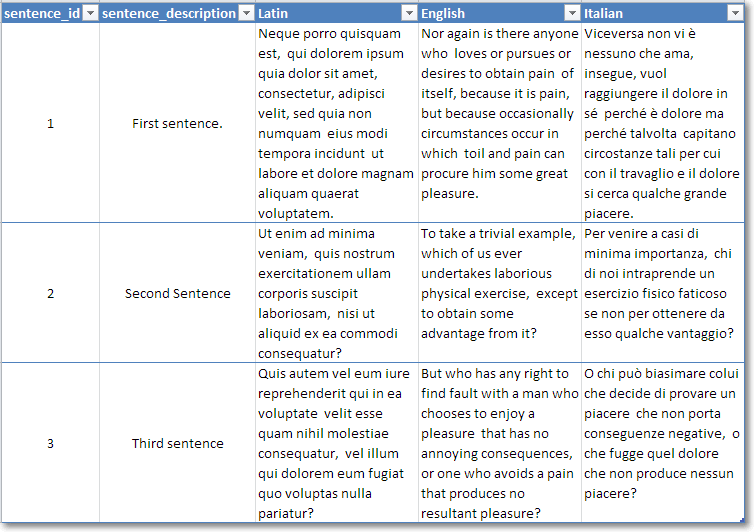
With a little of PIVOT, UNPIVOT and FOR XML you can achieve really surprising results, you just need to unleash your creativity.
Formatting dates in T-SQL
First of all, let me say it: I don’t think this should ever be done on the database side. Formatting dates is a task that belongs to the application side and procedural languages are already featured with lots of functions to deal with dates and regional formats.
However, since the question keeps coming up on the forums at SQLServerCentral, I decided to code a simple scalar UDF to format dates.
/*
 * AUTHOR: Gianluca Sartori @spaghettidba
 * Returns a data formatted according to the format String.
 * The format string can contain the following tokens in any order:
 *
 * yy	--> Year, two digits
 * YYYY	--> Year, four digits
 * MM	--> Month, two digits
 * m	--> Month, one digit
 * DD	--> Day, two digits
 * d	--> Day, one digit
 * HH	--> Hour, two digits
 * h	--> Hour, one digit
 * NN	--> Minute, two digits
 * n	--> Minute, one digit
 * SS	--> Second, two digits
 * s	--> Second, one digit
 * AP	--> AM/PM
 *
 * Any character not in the token list gets concatenated
 * to the string and left untouched.
 *
 * EXAMPLE:
 * SELECT dbo.formatDate(GETDATE(), 'YYYY-MM-DD hh:nn:ss')
 * OUTPUT: 2007-01-25 17:35:21
 *
 * SELECT dbo.formatDate(GETDATE(), 'DD-MM-YYYY')
 * OUTPUT: 25-01-2007
 */
CREATE FUNCTION [dbo].[formatDate](@date as datetime, @format_string as varchar(50)  )
RETURNS varchar(50)
AS
BEGIN
    DECLARE @format varchar(50)
    DECLARE @result AS varchar(50)
    DECLARE @iter AS int
    DECLARE @prevchar AS char(1)
    DECLARE @currchar AS char(1)
    DECLARE @currtoken AS varchar(4)


    SET @iter = 1
    SET @result = ''
    SET @format = CONVERT(varchar(50),@format_string) COLLATE Latin1_General_CS_AS

    WHILE @iter <= LEN(@format)
    BEGIN
        SET @currchar = CONVERT(char(1),SUBSTRING(@format,@iter,1)) COLLATE Latin1_General_CS_AS
        IF @currchar <> @prevchar OR @iter = LEN(@format)
        BEGIN
            SET @currtoken =
                CASE (@prevchar) COLLATE Latin1_General_CS_AS -- Use a case-sensitive collation
                    WHEN 'Y' THEN RIGHT('0000' + CAST(YEAR(@date) AS varchar(4)),4)
                    WHEN 'y' THEN RIGHT('00' + CAST(YEAR(@date) AS varchar(4)),2)
                    WHEN 'M' THEN RIGHT('00' + CAST(MONTH(@date) AS varchar(2)),2)
                    WHEN 'm' THEN CAST(MONTH(@date) AS varchar(2))
                    WHEN 'D' THEN RIGHT('00' + CAST(DAY(@date) AS varchar(2)),2)
                    WHEN 'd' THEN CAST(DAY(@date) AS varchar(2))
                    WHEN 'H' THEN RIGHT('00' + CAST(DATEPART(hour,@date) AS varchar(2)),2)
                    WHEN 'h' THEN CAST(DATEPART(hour,@date) AS varchar(2))
                    WHEN 'N' THEN RIGHT('00' + CAST(DATEPART(minute,@date) AS varchar(2)),2)
                    WHEN 'n' THEN CAST(DATEPART(minute,@date) AS varchar(2))
                    WHEN 'S' THEN RIGHT('00' + CAST(DATEPART(second,@date) AS varchar(2)),2)
                    WHEN 's' THEN CAST(DATEPART(second,@date) AS varchar(2))
                    WHEN 'A' THEN CASE WHEN DATEPART(hour,@date) >= 12 THEN 'PM' ELSE 'AM' END
                    WHEN ' ' THEN ' '
                    ELSE RTRIM(@prevchar)
                END
            SET @result = @result + @currtoken
        END
        SET @prevchar = @currchar COLLATE Latin1_General_CS_AS
        SET @iter = @iter + 1
    END
    RETURN @result
END
Let’s see this function in action:
SELECT dbo.formatDate(GETDATE(), 'YYYY-MM-d h:NN:SS AP')
-- RETURNS: 2011-10-5 18:07:09 PM
SELECT dbo.formatDate(GETDATE(), 'YYYY-MM-DD HH:NN:SS')
-- RETURNS: 2011-10-05 18:07:09
The code is simple and (I hope) clear enough. It’s not intended to be the best way to format dates in T-SQL and, honestly, I hope it contains some nasty hidden bug, because you shouldn’t be using this code at all!
For more information on custom date formats in SQLServer, see this post: SQL Server and custom date formats
Typing the Backtick key on non-US Keyboards
You may be surprised to know that not all keyboard layouts include the backtick key, and if you happen to live in a country with such a layout and want to do some PowerShell coding, you’re in big trouble.
For many years all major programming languages took this layout mismatch into consideration and avoided the use of US-only keys in the language definition. Now, with PowerShell, serious issues arise for those that want to wrap their code on multiple lines and reach for the backtick key, staring hopelessly at an Italian keyboard.
See? No backtick.

The only way to type a key not present in your keyboard layout is using the numeric pad with the ALT key, so that, for instance, backtick becomes ALT+Numpad9+Numpad6.
This method is painful enough itself, but quickly becomes a nightmare when working on a laptop, where probably there’s no hardware numeric pad. This way, backtick becomes NumLock+ALT+Numpad9+Numpad6+NumLock.
OMG! 5 keys instead of 1! No way: we need to find a workaround!
If I can’t type the backtick directly, I can always build a small application that types that key for me. Even better, I could unleash my google-fu and find a ready-made one, such as Independent SendKeys.
This small application is able to send keystrokes to any application running on Windows, found by window title. When a blank window title is specified, the SendKeys interacts with the current active window and can send the backtick keystroke. When invoked with no arguments, it displays a help window, which allowed me to come out with this syntax:
sendkeys.exe 0 2 “” “`”
Now I just need to associate this command with one of the keys on my keyboard.
Some fancy keyboards come with special keys to open the web browser or the e-mail client, such as this one:

I have always found those keys nearly useless and I would happily barter one for the backtick key. The good news is that it can be done, even without one of those special keys on the keyboard
To change the behaviour of one of those keys, you just have to open the registry and navigate to HKEY_LOCAL_MACHINE\SOFTWARE\Microsoft\Windows\CurrentVersion\Explorer\AppKey. Typically, you should find 4 or 5 subkeys, that identify what Windows will do when one of those keys gets pressed.

In this case, I chose to replace the e-mail key with backtick, using the SendKeys application. It’s very easy: you just have to rename the “Association” REG_SZ into “_Association” (you can leave it there in case you decide to restore the original behaviour) and add a new string value ShellExecute = 0 2 “” “`”
With this registry hack in place, whenever you press the e-mail key, SendKeys types a backtick on the active window. Mission accomplished? Not completely: the e-mail key is not easy to use, because it was not meant for typing and you will probably find it slightly out of reach.
To type the backtick more easily, you need to immolate one of the other keys and make it act as if it was the e-mail key. In my case, the perfect candidate for the sacrifice is the ScrollLock key, which I don’t remember having used in 20 years. I’m sure I won’t miss it.
To teach Windows to swap the keys I would need to apply another registry hack, but it’s too complicated to use and explain, especially because there’s a nice little application that can do that for me.
SharpKeys is an application that can remap the keyboard and make a key act as if another key was pressed instead. It does not need to run in background or start with windows, because it’s just a user friendly interface for a registry hack. Once the hack is active, you can even uninstall it if you like.

In this screen capture, I set the ScrollLock key to act as the e-mail key. As you can see, SharpKeys always assumes you are using the US layout and displays the key accordingly, but the important thing is that it can recognize the correct scancode and remap it to the e-mail key.
The nice thing about this hack is that you can use it even if you don’t have the mapped key in your keyboard. In fact, on my laptop there’s no e-mail key at all.
After rempapping the keys, Windows will start typing backticks whenever you press the ScrollLock key.
Now you can focus on Powershell itself, not on memorizing ASCII codes!
EDIT 20/09/2011: In the first version of this post I suggested remapping the e-mail key to the § symbol (which is probably the most useless key on my keyboard), but, actually that would have mapped the WHOLE key, thus loosing the ability to type the “ù” char. That’s why I changed this post and decided to remap the ScrollLock key instead. My apologies to those who followed my advice and lost their “ù”.
EDIT 21/03/2019: The Microsoft Keyboard Layout Creator can help you create a custom keyboard layout that contains the backtick character mapped to any key combination you find appropriate. Go give it a try.
Jeff Moden is the Exceptional DBA 2011!
The contest is over and the winner is Jeff Moden!
Champagne!

I won’t repeat all the reasons why I think that Jeff deserves the award, I just want to say that I could not agree more with this result.
To say it with Grant Fritchey’s (blog|twitter) words: “Of the year? I think I’d put it down to of the decade, but that’s not what the contest was.”
The exceptional DBA 2011 Jeff Moden will receive:
- a trophy at PASS Summit 2011
- a full conference registration for theSummit
- four nights’ accommodations and $300 in travel expenses
- a copy of Red Gate’s SQL Toolbelt
Congratulations Jeff, well deserved.
A better sp_MSForEachDB
Though undocumented and unsupported, I’m sure that at least once you happened to use Microsoft’s built-in stored procedure to execute a statement against all databases. Let’s face it: it comes handy very often, especially for maintenance tasks.
Some months ago, Aaron Bertand (blog|twitter) came up with a nice replacement and I thought it would be fun to code my own.
The main difference with his (and Microsoft’s) implementation is the absence of a cursor. While flagged correctly (LOCAL FORWARD_ONLY STATIC READ_ONLY) and run against a temporary table, nevertheless I was a bit disturbed by that tiny little cursor, so I decided to get rid of it.
Basically, my code relies on a dynamic SQL pushed down three levels:
- sp_executesql
- sp_executesql
- EXEC
This trick can be used as many times as you like, given that you keep on declaring and passing all the parameters you need to the lower levels.
I didn’t provide ad-hoc parameters to implement complex filters on sysdatabases, as I’m convinced that they would not be useful enough in a day to day use. If you like this code and want to use it, feel free to change it to incorporate any kind of filter.
Here is the code:
| -- https://spaghettidba.com/2011/09/09/a-better-sp_msforeachdb/ | |
| -- | |
| -- Author: Gianluca Sartori @spaghettidba | |
| -- Date: 2011/09/09 | |
| -- | |
| -- Description: Executes a statement against multiple databases | |
| -- Parameters: | |
| -- @statement: The statement to execute | |
| -- @replacechar: The character to replace with the database name | |
| -- @name_pattern: The pattern to select the databases | |
| -- It can be: | |
| -- * NULL - Returns all databases | |
| -- * [USER] - Returns users databases only | |
| -- * [SYSTEM] - Returns system databases only | |
| -- * A pattern to use in a LIKE predicate against the database name | |
| CREATE PROCEDURE [dba_ForEachDB] | |
| @statement nvarchar(max), | |
| @replacechar nchar(1) = N'?', | |
| @name_pattern nvarchar(500) = NULL | |
| AS | |
| BEGIN | |
| SET NOCOUNT ON | |
| DECLARE @sql nvarchar(max) | |
| -- LEVEL 3: | |
| -- Build an intermediate statement that replaces the '?' char | |
| SET @sql = 'SET @statement = REPLACE(@statement,'''+ @replacechar +''',DB_NAME()); EXEC(@statement);' | |
| SET @sql = REPLACE(@sql, '''', '''''') | |
| SET @sql = 'N''' + @sql + '''' | |
| -- LEVEL 2: | |
| -- Build a statement to execute on each database context | |
| ;WITH dbs AS ( | |
| SELECT *, | |
| system_db = CASE WHEN name IN ('master','model','msdb','tempdb') THEN 1 ELSE 0 END | |
| FROM sys.databases | |
| WHERE DATABASEPROPERTY(name, 'IsSingleUser') = 0 | |
| AND HAS_DBACCESS(name) = 1 | |
| AND state_desc = 'ONLINE' | |
| ) | |
| SELECT @sql = ( | |
| SELECT | |
| 'EXEC ' + QUOTENAME(name) + '.sys.sp_executesql ' + | |
| @sql + ',' + | |
| 'N''@statement nvarchar(max)'',' + | |
| '@statement;' AS [text()] | |
| FROM dbs | |
| WHERE 1 = | |
| CASE | |
| -- No filter? Return all databases | |
| WHEN @name_pattern IS NULL THEN 1 | |
| -- User databases | |
| WHEN @name_pattern = '[USER]' THEN system_db + 1 | |
| -- System databases | |
| WHEN @name_pattern = '[SYSTEM]' THEN system_db | |
| -- LIKE filter | |
| WHEN name LIKE @name_pattern THEN 1 | |
| END | |
| ORDER BY name | |
| FOR XML PATH('') | |
| ) | |
| -- LEVEL 1: | |
| -- Execute multi-db sql and pass in the actual statement | |
| EXEC sp_executeSQL @sql, N'@statement nvarchar(max)', @statement | |
| END |
Let’s see some examples of its use:
Print the database name for each user database:
EXEC [dba_ForEachDB] @statement = 'PRINT DB_NAME()', @replacechar = '?', @name_pattern = '[USER]'
Display the file path of each database file of system databases:
EXEC [dba_ForEachDB] @statement = 'SELECT physical_name, size FROM sys.database_files', @replacechar = '?', @name_pattern = '[SYSTEM]'
I hope you like it and find it useful.
Happy coding.
Enforcing Complex Constraints with Indexed Views
Some days ago I blogged about a weird behaviour of “table-level” CHECK constraints. You can find that post here.
Somehow, I did not buy the idea that a CHECK with a scalar UDF or a trigger were the only possible solutions. Scalar UDFs are dog-slow and also triggers are evil.
I also read this interesting article by Alexander Kuznetsov (blog) and some ideas started to flow.
Scalar UDFs are dog-slow because the function gets invoked RBAR (Row-By-Agonizing-Row, for those that don’t know this “Modenism”). If the UDF performs data access, the statement in the scalar function gets invoked for each row, hitting performance badly.
Triggers are evil, according to Glenn Berry (blog|twitter), because they are a “bad” way to implement referential integrity. Moreover, from a performance standpoint, even if triggers work with sets instead of rows (unlike UDFs), they fire an additional query (or even more than one).
However, I seem to have found a way to merge the “business logic” query plan into the same execution plan of the external DML statement that modifies the data.
The method I will discuss here makes use of Indexed Views.
First of all, we will need some tables.

And now some business rules:
- Users with a premium account can place orders with an unlimited total amount. Users with a normal account can place orders limited to a $1000 total amount.
- Minors cannot buy products in the ‘ADULT’ category.
Let’s create the tables and populate them with some sample data:
USE tempdb;
GO

-- Create users table
CREATE TABLE Users (
        user_id int PRIMARY KEY,
        user_name nvarchar(30) NOT NULL,
        birth_date date
)
GO

CREATE TABLE AccountTypes (
        account_type_id int PRIMARY KEY,
        account_type_code char(3) NOT NULL UNIQUE,
        account_type_description nvarchar(255) NOT NULL
)
GO

-- Create account table
CREATE TABLE Accounts (
        account_id int PRIMARY KEY,
        user_id int FOREIGN KEY REFERENCES Users(user_id),
        balance decimal(10,2),
        account_type_id int FOREIGN KEY REFERENCES AccountTypes(account_type_id)
)
GO

-- Create product categories table
CREATE TABLE ProductCategories (
        product_category_id int PRIMARY KEY,
        product_category_code char(5) NOT NULL UNIQUE,
        product_category_description nvarchar(255) NOT NULL
)
GO

-- Create products table
CREATE TABLE Products (
        product_id int PRIMARY KEY,
        EAN_code char(18) NOT NULL,
        product_description nvarchar(255) NOT NULL,
        product_category_id int FOREIGN KEY REFERENCES ProductCategories(product_category_id),
)
GO

-- Create orders table
CREATE TABLE Orders (
        order_id int PRIMARY KEY,
        user_id int FOREIGN KEY REFERENCES Users(user_id),
        total_amount decimal(10,2) NOT NULL CHECK(total_amount > 0),
        order_date datetime NOT NULL
)
GO

-- Create order details table
CREATE TABLE OrderDetails (
        order_id int NOT NULL FOREIGN KEY REFERENCES Orders(order_id),
        order_line int NOT NULL CHECK(order_line > 0),
        product_id int NOT NULL FOREIGN KEY REFERENCES Products(product_id),
        quantity int NOT NULL CHECK(quantity > 0),
        PRIMARY KEY(order_id, order_line)
)
GO

-- Insert sample data
INSERT INTO Users(user_id, user_name, birth_date)
        VALUES (1, N'Gianluca Sartori', '1977-11-25') –- This is me
INSERT INTO Users(user_id, user_name, birth_date)
        VALUES (2, N'Mladen Prajdić',   '1980-08-16') -- I suspect this is not Mladen’s birthday
INSERT INTO Users(user_id, user_name, birth_date)
        VALUES (3, N'Giulia Sartori',   '2009-07-02') -- This is my 2 year old baby girl
INSERT INTO AccountTypes(account_type_id, account_type_code, account_type_description)
        VALUES (1, 'NOR', N'Normal account')
INSERT INTO AccountTypes(account_type_id, account_type_code, account_type_description)
        VALUES (2, 'PRE', N'Premium account')

INSERT INTO Accounts(account_id, user_id, balance, account_type_id) VALUES (1, 1, 520, 2)
INSERT INTO Accounts(account_id, user_id, balance, account_type_id) VALUES (2, 2, 376, 2)
INSERT INTO Accounts(account_id, user_id, balance, account_type_id) VALUES (3, 3, 31,  1)

INSERT INTO ProductCategories(product_category_id, product_category_code, product_category_description)
        VALUES (1, 'MSCCD', N'Music CDs')
INSERT INTO ProductCategories(product_category_id, product_category_code, product_category_description)
        VALUES (2, 'TOONS', N'Disney Cartoons')
INSERT INTO ProductCategories(product_category_id, product_category_code, product_category_description)
        VALUES (3, 'ADULT', N'Adult stuff')

INSERT INTO Products(product_id, EAN_code, product_description, product_category_id)
        VALUES (1, 'MMFAFGRCDGKDGQEJ10', N'AC/DC – Back in Black', 1)
INSERT INTO Products(product_id, EAN_code, product_description, product_category_id)
        VALUES (2, 'DD245FS6D3KBNSDWNF', N'Finding Nemo', 2)
INSERT INTO Products(product_id, EAN_code, product_description, product_category_id)
        VALUES (3, 'B87S0NFDKSDFSAP2IS', N'Pics of hot chicks with little or no clothes to share with your friends on Twitter', 3)
Now that sample data is ready, let’s enforce the business rule #1: orders from users with a normal account must be limited to $1000.
To achieve this, we have to create an additional “dummy” table that holds exactly two rows. This table exists with the only purpose to implement a cartesian product and violate a UNIQUE constraint in the indexed view.
-- Create dummy table to store exactly two rows
CREATE TABLE TwoRows (
        N int NOT NULL PRIMARY KEY
)

INSERT INTO TwoRows VALUES(1)
INSERT INTO TwoRows VALUES(2)
GO
Everything is ready to create the view and the UNIQUE index bound to it:
CREATE VIEW CHECK_Orders_Amount
WITH SCHEMABINDING
AS
SELECT 1 AS ONE
FROM dbo.Orders AS ORD
INNER JOIN dbo.Accounts AS ACCT
        ON ORD.user_id = ACCT.user_id
INNER JOIN dbo.AccountTypes AS ACTY
        ON ACCT.account_type_id = ACTY.account_type_id
CROSS JOIN dbo.TwoRows AS TR
WHERE ORD.total_amount >= 1000
        AND ACTY.account_type_code <> 'PRE'

GO

CREATE UNIQUE CLUSTERED INDEX IX_CHECK_Orders_Accounts ON dbo.CHECK_Orders_Amount(ONE)
GO
We can now insert some sample data to test if the business rule gets enforced:
-- Insert order #1 for user #1 (me) and total amount $2500. Works.
INSERT INTO Orders (order_id, user_id, total_amount, order_date) VALUES (1, 1, 2500.00, GETDATE())
-- Insert order #2 for user #2 (Mladen) and total amount $500. Works
INSERT INTO Orders (order_id, user_id, total_amount, order_date) VALUES (2, 2, 500.00, GETDATE())

-- Insert order #3 for user #3 (My 2 year-old daughter) and total amount $5000. OUCH! Violates the UNIQUE constraint.
INSERT INTO Orders (order_id, user_id, total_amount, order_date) VALUES (3, 3, 5000.00, GETDATE())
-- Insert order #3 for Giulia with total amount $100. Works
INSERT INTO Orders (order_id, user_id, total_amount, order_date) VALUES (3, 3, 100.00, GETDATE())
If we look at the execution plan of the INSERT statements, we can see that the indexed view maintenance is merged into the INSERT query plan:

It may be interesting to note that SQL Server is smart enough to identify the statements that require updating the indexed view. For instance, if we try to update a column that is not used in the indexed view, we won’t see any index maintenance in the query plan.
For instance, we could update order_id and examine the query plan:
-- This statement does not update the indexed view, so it is not included in the plan
UPDATE Orders SET order_id = 3 WHERE order_id = 2
GO

As you can see, there is no need to maintain the index on the view. To achieve the same with a trigger, you would have to explicitly define the behaviour of the code using IF UPDATE(ColumnName).
Moreover, the UNIQUE constraint gets evaluated whenever ANY table used in the indexed view gets modified: this would be very hard to achieve with a trigger.
Now that the first business rule is set, we can proceed with the second one: no ‘ADULT’ products can be ordered by minors.
This can get a tricky requirement, as we might be tempted to calculate the age of the user comparing it to GETDATE(). Unfortunately, non-deterministic functions cannot be used in indexed views. We will have to get around it by using the order_date column, that was set to GETDATE() previously.
CREATE VIEW CHECK_Orders_Adult
WITH SCHEMABINDING
AS
SELECT 1 AS ONE
FROM dbo.Orders AS ORD
CROSS JOIN dbo.TwoRows
INNER JOIN dbo.OrderDetails AS ODT
        ON ORD.order_id = ODT.order_id
INNER JOIN dbo.Products AS PR
        ON ODT.product_id = PR.product_id
INNER JOIN dbo.ProductCategories AS PRC
        ON PR.product_category_id = PRC.product_category_id
INNER JOIN dbo.Users AS USR
        ON ORD.user_id = USR.user_id
WHERE PRC.product_category_code = 'ADULT'
        AND DATEADD(year, 18, USR.birth_date) > ORD.order_date
GO

CREATE UNIQUE CLUSTERED INDEX IX_CHECK_Orders_Adult ON dbo.CHECK_Orders_adult(ONE)
GO
With the constraint in place, we can try to verify if the business rule gets enforced:
-- I order the AC/DC album. I will listen to it in my car while driving.
INSERT INTO OrderDetails (order_id, order_line, product_id, quantity) VALUES (1, 1, 1, 1)
-- Mladen orders the hot chicks DVD to send the pics via Twitter.
INSERT INTO OrderDetails (order_id, order_line, product_id, quantity) VALUES (2, 1, 3, 1)
-- Giulia tries to buy the hot chicks DVD as well. She likes boobs. For the milk, I suspect.
-- Fortunately, the INSERT statement fails.
INSERT INTO OrderDetails (order_id, order_line, product_id, quantity) VALUES (3, 1, 3, 1)
-- OK, Giulia: you'd better buy a Disney DVD
INSERT INTO OrderDetails (order_id, order_line, product_id, quantity) VALUES (3, 1, 2, 1)
Conclusion
Indexed Views provide an elegant way to enforce business rules that go beyond the scope of a single row in a table, without the kludge of CHECK constraints with scalar UDFs or the pain of DML triggers.
However, some limitations apply:
- Not all queries can be expressed in a way that can be used in an Indexed View. You can’t use non-deterministic functions, common table expressions, subqueries or self joins.
- Indexed Views cannot perform cross-database queries. If the business rule must be verified against a table stored in a different database, this method cannot be used.
Picking the right tool among CHECK constraints and triggers can be a hard decision. But now, hopefully, you have another option. 😉
P.S. : Mladen Prajdić (blog|twitter) kindly gave his blessing to the publishing of this post.
Exceptional DBA Awards 2011
Time has come for the annual Exceptional DBA Awards contest, sponsored by Red Gate and judged by four really exceptional DBAs:
- Steve Jones (blog|twitter)
- Rodney Landrum (blog|twitter)
- Brad McGehee (blog|twitter)
- Brent Ozar (blog|twitter)
The judges picked their finalists and it would really be hard to choose the winner if I didn’t happen to know one of them.
I won’t talk around it: please vote for Jeff Moden!
I don’t know the other three finalists and I am sure that they really are very good DBAs, probably exceptional DBAs, otherwise they would not have made it to the final showdown. But I have no doubt that Jeff is the one to vote.
There is something that goes beyond being exceptional. I can’t give it a name, but I will try to explain it.
Some years ago, I was working primarily as a developer at a big shoe company and I was one of those “Accidental” DBAs lurking on the SQL Server Central forums struggling to expand their knowledge. I already had a long experience in database development, but, at that time, I also needed to start learning how to take care of my databases. Whenever I had an issue, SQL Server Central had a thread with an answer for me.
One day, I stumbled upon a question and, surprisingly enough, I happened to know the answer. That day, when I hit the “reply” button, I had no idea of the great journey that was ahead of me.
SQL Server Central people are exceptional and the forums are totally addictive. Long story short, I became one of the “regulars”. I could not stay away from the forums and checking the e-mail notifications became part of my morning tasks.
Among the other regulars, there was one folk with a funny signature, a sort of manifesto of the anti-RBAR party. “RBAR”: a made-up word that probably very few people knew at the time, which now is just the right word to say it when you do it “Row By Agonizing Row”!
That guy with the funny signature was one of the most active members and it looked like he spent the whole night posting on the forums (and he probably did). His replies were always smart, spot-on and humorous.
He also had published some articles where he preached avoiding cursors like the plague and replacing them with the T-SQL Swiss army knife “par excellence”: the Tally table.
Needless to say, the folk’s name is Jeff Moden.
 His articles are always enlightening and thorough, shipped with the complete code and solid performance demonstration. Jeff’s writing style is unique and engaging: you would recognize one of his articles even if he published under a pseudonym (which he did, actually. Remember Phil McCracken?).
I have never met Jeff in person, but I consider him a good friend. He also helped me write my first article for SSC: his hair must have turned white when he read the first draft and his beard must have grown an inch when he saw my poor English. Nonetheless, his kind words, encouragement and suggestions helped me accomplish that article and I consider him one of the main culprits if now I’m not just a thread-aholic, but I also turned into a blog-aholic.
Jeff deserves your vote, because he is an exceptional person and an exceptional DBA. People like him are more than exceptional: they’re one of a kind. I don’t know the other three finalists, but I want to believe they’re not as exceptional as Jeff, otherwise I would have to feel even more humbled compared to them.
Go vote for Jeff, and, even more important, read his articles. You will find them enjoyable and inspiring.
Table-level CHECK constraints
EDITED 2011-08-05: This post is NOT about the “correct” way to implement table-level check constraints. If that is what you’re looking for, see this post instead.
Today on SQL Server Central I stumbled upon an apparently simple question on CHECK constraints. The question can be found here.
The OP wanted to know how to implement a CHECK constraint based on data from another table. In particular, he wanted to prohibit modifications to records in a detail table based on a datetime column on the master table. A simple way to achieve it is to use a trigger, but he was concerned about performance and wanted to implement it with a CHECK constraint.
Let’s see how this can be done. First of all, we will need a couple of test tables, with some sample data:
USE tempdb;
GO

-- Create master table
CREATE TABLE masterTable (
        id int identity(1,1) PRIMARY KEY,
        dateColumn datetime
)
GO

-- Create referenced table
CREATE TABLE detailTable (
        id int identity(1,1) PRIMARY KEY,
        master_id int FOREIGN KEY REFERENCES masterTable(id),
        valueColumn varchar(50)
)
GO

-- Insert sample data
INSERT INTO masterTable(dateColumn) VALUES(GETDATE())
INSERT INTO masterTable(dateColumn) VALUES(DATEADD(day,-1,GETDATE()))
INSERT INTO masterTable(dateColumn) VALUES(DATEADD(day,-2,GETDATE()))

SELECT * FROM masterTable

-- Insert sample data in referenced table
INSERT INTO detailTable(master_id, valueColumn) VALUES (1,'Value for id 1')
INSERT INTO detailTable(master_id, valueColumn) VALUES (2,'Value for id 2')
INSERT INTO detailTable(master_id, valueColumn) VALUES (3,'Value for id 3')

SELECT * FROM detailTable
Now we need to create the CHECK constraint. The only way to code it to validate data against a different table is to use a scalar UDF, which, to answer the original question, makes it a poor choice from a performance standpoint.
-- Create a scalar UDF: you will need this in the CHECK constraint
CREATE FUNCTION getMasterDate(@id int)
RETURNS datetime
AS
BEGIN
        RETURN ISNULL((SELECT dateColumn FROM masterTable WHERE id = @id),'30110101')
END
GO

-- Add the constraint WITH NOCHECK: existing rows are not affected
ALTER TABLE detailTable WITH NOCHECK ADD CONSTRAINT chk_date
        CHECK (DATEADD(day,-1,GETDATE()) > dbo.getMasterDate(master_id))
No surprises: the constraints gets added to the table and SQL Server does not complain about the existing rows that don’t pass the check, since we decided to use the NOCHECK switch.
Now, with the constraint in place, we should be unable to modify the data in a way that violates the constraint:
UPDATE detailTable
SET valueColumn = 'New ' + valueColumn
Surprise! Some rows conflict with the CHECK constraint, but no complaints from SQL Server, because the constraint is attached to a single column (master_id), and we left that column untouched.
In fact, if we query sys.check_constraints, we can see that this is a column-scoped constraint:
SELECT parent_column_id, definition, is_not_trusted
FROM sys.check_constraints
WHERE parent_object_id = OBJECT_ID('detailTable')
Parent_column_id = 0 means table scoped constraint, parent_column_id > 0 means column-scoped constraint.
If we try to update the column “master_id”, the constraint prevents the modification:
-- If you try to update master_id it fails
UPDATE detailTable
SET master_id = master_id + 1 - 1
Msg 547, Level 16, State 0, Line 2
The UPDATE statement conflicted with the CHECK constraint "chk_date". The conflict occurred in database "tempdb", table "dbo.detailTable", column 'master_id'.
The statement has been terminated.
What is really surprising is how SQL Server behaves if we decide to make the constraint table-scoped, adding another predicate to the CHECK:
-- Drop the constraint
ALTER TABLE detailTable DROP CONSTRAINT chk_date
GO

-- Create the constraint referencing multiple columns
ALTER TABLE detailTable WITH NOCHECK ADD CONSTRAINT chk_date
        CHECK (
                DATEADD(day,-1,GETDATE()) > dbo.getMasterDate(master_id)
                AND
                ISNULL(valueColumn,'') = ISNULL(valueColumn,SPACE(0))
        )
GO
As we might expect, it doesn’t work any more:
UPDATE detailTable
SET valueColumn = 'New ' + valueColumn
Msg 547, Level 16, State 0, Line 2
The UPDATE statement conflicted with the CHECK constraint "chk_date". The conflict occurred in database "tempdb", table "dbo.detailTable", column 'master_id'.
The statement has been terminated.
But, wait: what is REALLY attaching the constraint to the column we are trying to modify? Does a thing such as a “table-scoped” constraint really exist?
We just need to add another column and see how it changes the behaviour of the CHECK constraint:
ALTER TABLE detailTable ADD anotherColumn int
Now, if we try to update the newly created column, since we have a “table-scoped” CHECK constraint, we should get an error:
UPDATE detailTable
SET anotherColumn = 1
… but it’s not so!
(3 row(s) affected)
The constraint does not include any reference to “anotherColumn”, so it does not even get executed. If you don’t believe it is so, you can check with Profiler and capture any call to scalard UDFs: you wan’t see any in this case.
This means that what Microsoft calls a table level CHECK constraint is something that does not really exist and a better name for it would be “Multicolumn CHECK constraint”.
The main thing to keep in mind is that if we want the constraint to check the data regardless of the column getting modified we MUST include ALL the columns of the table in the constraint definition.


 spaghettidba