My stored procedure code template
Do you use code templates in SSMS? I am sure that at least once you happened to click “New stored procedure” in the object explorer context menu.
The default template for this action is a bit disappointing and the only valuable line is “SET NOCOUNT ON”. The rest of the code has to be heavily rewritten or deleted. Even if you use the handy keyboard shortcut for “Specify values for template parameters” (CTRL+SHIFT+M), you end up entering a lot of useless values. For instance, I find it very annoying having to enter stored procedure parameters definitions separately for name, type and default value.
Moreover, one of the questions I see asked over and over in the forums at SqlServerCentral is how to handle transactions and errors in a stored procedure, something that the default template does not.
Long story short, I’m not very happy with the built-in template, so I decided to code my own:
-- =============================================
-- Author:      <Author,,Name>
-- Create date: <Create Date,,>
-- Description: <Description,,>
-- =============================================
CREATE PROCEDURE <ProcedureName, sysname, >
AS
BEGIN
    SET NOCOUNT ON;
    SET XACT_ABORT,
        QUOTED_IDENTIFIER,
        ANSI_NULLS,
        ANSI_PADDING,
        ANSI_WARNINGS,
        ARITHABORT,
        CONCAT_NULL_YIELDS_NULL ON;
    SET NUMERIC_ROUNDABORT OFF;

    DECLARE @localTran bit
    IF @@TRANCOUNT = 0
    BEGIN
        SET @localTran = 1
        BEGIN TRANSACTION LocalTran
    END

    BEGIN TRY

        --Insert code here

        IF @localTran = 1 AND XACT_STATE() = 1
            COMMIT TRAN LocalTran

    END TRY
    BEGIN CATCH

        DECLARE @ErrorMessage NVARCHAR(4000)
        DECLARE @ErrorSeverity INT
        DECLARE @ErrorState INT

        SELECT  @ErrorMessage = ERROR_MESSAGE(),
                @ErrorSeverity = ERROR_SEVERITY(),
                @ErrorState = ERROR_STATE()

        IF @localTran = 1 AND XACT_STATE() <> 0
            ROLLBACK TRAN

        RAISERROR ( @ErrorMessage, @ErrorSeverity, @ErrorState)

    END CATCH

END
This template can be saved in the default path and overwrite the kludgy “New Stored Procedure” built-in template.
Some things to keep in mind:
- I don’t use nested transactions (they’re totally pointless IMHO) and I check for an existing transaction instead.
- The stored procedure will commit/rollback the transaction only if it was started inside the procedure.
- I want every stored procedure to throw the errors it catches. If there’s another calling procedure, it will take care of the errors in the same way.
- This is your computer: you can safely replace <Author, ,Name> with your real name.
- It would really be nice if there was some kind of way to make SSMS fill <Create Date, ,> with the current date. Unfortunately there’s no way. If you are using CVS or some other kind of version control system, this is a nice place for an RCS string such as $Date$
- If you like templates parameters and you heard bad news regarding this feature in the next version of SQL Server (codename Denali), don’t worry: MS fixed it.
Backup all user databases with TDPSQL
Stanislav Kamaletdin (twitter) today asked on #sqlhelp how to backup all user databases with TDP for SQL Server:

My first thought was to use the “*” wildcard, but this actually means all databases, not just user databases.
I ended up adapting a small batch file I’ve been using for a long time to take backups of all user databases with full recovery model:
@ECHO OFF

SQLCMD -E -Q "SET NOCOUNT ON; SELECT name FROM sys.databases WHERE name NOT IN ('master','model','msdb','tempdb')" -h -1 -o tdpsql_input.txt
FOR /F %%A IN (tdpsql_input.txt) DO CALL :perform %%A

GOTO end_batch

:perform
tdpsqlc backup %1 full /configfile=tdpsql.cfg /tsmoptfile=dsm.opt /sqlserver=servername /logfile=tdpsqlc.log

:end_batch
Most of the “trick” is in the SQLCMD line:
- -Q “query” executes the query and returns. I added “SET NOCOUNT ON;” to eliminate the row count from the output.
- -h -1 suppresses the column headers
- -o tdpsql_input.txt redirects the output to a text file
FOR /F %%A IN (tdpsql_input.txt) DO CALL :perform %%AThe Spaghetti-Western Database
Today I noticed in my WordPress site stats that somebody landed on this blog from a search engine with the keywords “spaghetti dba”.
I found it hilarious that somebody was really searching for me that way, and I performed the search on Google to see how this blog would rank.
The third result from Google made me chuckle: The Spaghetti-Western Database Trailer. And here is the video showing on that page:
Awesome. I love Spaghetti-Western movies and I love databases, I couldn’t ask for more!
The video is a trailer to the site www.spaghetti-western.net and… Oh! Wait: is that a NoSQL database? #fail
Setting up linked servers with an out-of-process OLEDB provider
A new article on SQLServerCentral today: Setting up linked servers with an out-of-process OLEDB provider.
I had to struggle to find the appropriate security settings to make a commercial OLEDB provider work with out-of-process load and I want to share the results of my research with you.
It took 50 hours of Microsoft paid support to partially solve the issue and a huge time spent on Google and MSDN to find a complete resolution. I hope this can help those that will have to face the same issue some day.
Setup failed to start
Yesterday I ran into this error message while installing a new SQL Server 2005 instance on a Windows 2003 cluster:
Setup failed to start on the remote machine. Check the Task scheduler event log on the remote machine.

SQL Server 2005 setup, in a clustered environment, relies on a remote setup process started on the passive nodes through a scheduled task:
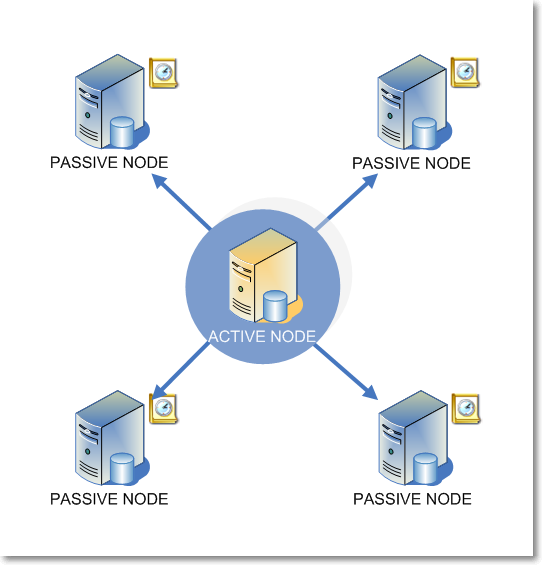
For some weird reason, the remote scheduled task refuses to start if there is an active RDP session on the passive nodes. This KB article describes symptoms and resolution in detail: http://support.microsoft.com/kb/910851/en-us
If you look into the Scheduled Tasks log you will find something similar to this:
sql server Task did not appear to start on machine <machine_name> 267015
Needless to say that one of my co-workers was logged on the desktop of one of the passive nodes. So, if you need another good reason to lock everyone out of your servers’ desktop, here it is.
After resetting the offending session, remember to log on to all the passive nodes and kill the zombie setup processes you may have left. Also, delete the scheduled tasks from each node.
Changing Server Collation
In order to avoid collation conflict issues with TempDB, all user databases on a SQL Server instance should be set to the same collation.
Temporary tables and table variables are stored in TempDB, that means that, unless explicitly defined, all character-based columns are created using the database collation, which is the same of the master database. If user databases have a different collation, joining physical tables to temporary tables may cause a collation conflict.
For instance you could have a user database with collation SQL_Latin1_General_CP1_CI_AS on a server with collation Latin1_General_CI_AS:
SELECT  name,
        collation_name,
        is_system =
        CASE
            WHEN name IN ('master', 'model', 'tempdb', 'msdb') THEN 1
            ELSE 0
        END
FROM    sys.databases
ORDER BY is_system DESC, name ASC

Every time you create a temporary table and join it to a permanent table in this database, you have to ensure that the collations match, or you will run into a collation conflict:
USE dblocal
GO

CREATE TABLE TestTable (
    testColumn varchar(10)
)

INSERT INTO TestTable VALUES ('conflict')

CREATE TABLE #TempTable (
    tempColumn varchar(10)
)

INSERT INTO #TempTable VALUES ('conflict')

SELECT *
FROM TestTable
INNER JOIN #TempTable
    ON testColumn = tempColumn

The only ways to avoid the conflict are:
- Define explicitly the collation on the temporary table with a collation name or database_default
- Add the COLLATE clause to the join predicate, using a collation name or database_default
-- OPTION 1: define the collation when creating the table
CREATE TABLE #TempTable (
    tempColumn varchar(10) COLLATE database_default
)

-- OPTION 2: force a specific collation when querying the table
SELECT *
FROM TestTable
INNER JOIN #TempTable
    ON testColumn = tempColumn COLLATE database_default
The first option must be preferred when possible, because it doesn’t need performing scalar calculations that end up making any index referencing the column virtually useless.
However, both methods require editing the code, which is not always possible. In those cases, changing the server collation is the only possible solution.
In the SQL Server 2000 days, there was a “nice” tool called rebuildm, that recreated the master database and could achieve this task simply. From SQL Server 2005 on, the only tool to rebuild system databases is the setup utility.
This is what Microsoft recommends to rebuild system databases: http://msdn.microsoft.com/en-us/library/ms179254.aspx
Setup /QUIET /ACTION=REBUILDDATABASE /INSTANCENAME=InstanceName
/SQLSYSADMINACCOUNTS=accounts /[ SAPWD= StrongPassword ]
/SQLCOLLATION=CollationName
Be warned that blogs and forums are filled with bad advice on this topic. The most frequent ones are these:
- Change the collation of the model database
TempDB is created from model when the service starts, which makes this method look smart. It’s not! Changing the database collation for model doesn’t change the collation of the objects inside the database: you would end up with a messy template for every new database. - Copy the model database from another instance with the desired collation.
It could work, given that you copy the database from an instance with the exact same @@version. Even if you managed to copy the database, tempdb would have a collation other than those of master and msdb, which would mean moving the original problem among the system databases. Believe me, this is not what you want.
The recommended method requires running the setup and usually is not a big deal. This blog on MSDN (CSS Support Engineers) describes in depth how the setup works and how to troubleshoot some common issues: http://blogs.msdn.com/b/psssql/archive/2008/08/29/how-to-rebuild-system-databases-in-sql-server-2008.aspx
An undocumented method
There seems to be another undocumented method, mentioned (and advertised as safe) by Paul Randal (blog | twitter) in one of his presentations: http://devconnections.com/updates/LasVegas_Fall10/SQL/Randal-SQL-SDB407-Undocumented.pdf (page 17). The method relies on a startup parameter that allows changing the server collation when combined with a couple of trace flags:
sqlservr -m -T4022 -T3659 -q"new collation"
Trace flag 3659 allows logging all errors to sql server logs
Trace flag 4022 forces SQL Server to skip startup stored procedures (if you have any).
Startup option “-m” forces single user mode.
Startup option “-q” rebuilds all databases and contained objects into the specified collation, without reinstalling the instance.
Besides being undocumented, this method seems to have some pitfalls. Gail Shaw (blog | twitter) raises a couple of warnings on this thread at SqlServerCentral: http://www.sqlservercentral.com/Forums/Topic269173-146-1.aspx
So, why recommend a method that could fail or cause harm to your instance? There is a scenario where this method comes extremely handy, mainly because the documented and supported method fails, which is a big SQL Server 2005 cluster.
One of the biggest innovations in SQL Server 2008 setup concerned the cluster installation: in SQL Server 2005 the setup process was run against all passive nodes and then against the active node for the instance, while SQL Server 2008 setup runs only against the local machine and has to be repeated for each node in the cluster.
Running the setup on all the passive nodes, as SQL Server 2005 setup does, can be a pain in the rear. The more nodes you have, more things can go wrong.
Despite all my efforts, I was unable to run the setup successfully with rebuild database action on a SQL Server 2005 cluster. The log files did not report anything useful for troubleshooting: they were only saying that one of the passive nodes could not complete the setup. I was ready to uninstall the instance and install from scratch when I came across the undocumented –q parameter. I tried (I had nothing to lose, after all) and it worked.
I hope it can work for you too.
Trace Flag 3659
Many setup scripts for SQL Server include the 3659 trace flag, but I could not find official documentation that explains exactly what this flag means.
After a lot of research, I found a reference to this flag in a script called AddSelfToSqlSysadmin, written by Ward Beattie, a developer in the SQL Server product group at Microsoft.
The script contains a line which suggests that this flag enables logging all errors to errorlog during server startup. I’m unsure of what kind of errors are not logged without setting the flag, but I didn’t find any further reference. The BOL page for Trace Flags doesn’t list this one, so if you happen to know something more, feel free to add a comment here.
Windows authenticated sysadmin, the painless way
Personally, I hate having a dedicated administrative account, different from the one I normally use to log on to my laptop, read my email, write code and perform all the tasks that do not involve administering a server. A dedicated account means another password to remember, renew periodically and reset whenever I insist typing it wrong (happens quite frequently).
I hate it, but I know I cannot avoid having it. Each user should be granted just the bare minimum privileges he needs, without creating dangerous overlaps, which end up avoiding small annoyances at the price of huge security breaches.
When I was working as a developer only, I was used to having my windows account registered as sysadmin on my dev box and, when I switched to a full time DBA role, it took me a while to understand how important it was to have a different sysadmin user for the production servers.
That said, one of the things that makes the use of dedicated administrative accounts awkward and frustrating is windows authentication in SSMS. While extremely handy when the user that has to log on to the database is the same logged on to windows, integrated security becomes pesky and uncomfortable when the database user is a different one.
No big deal, but launching SSMS as different user brings in some small annoying issues:
- SSMS must be opened choosing “Run as…” from the context menu.
It’s the most common way to run a program as a different user, but I would happily live without this additional step. - The user’s credentials have to be typed in.
OK, seems trivial, but I find it annoying. Typically, users with elevated privileges are subject to more stringent password policies, that means longer passwords, no dictionary words, symbols. Having to type such a password once a day is enough for me. - No drag & drop from other windows: neither files, nor text
This limit is imposed by windows, that filters the messages between processes in different security contexts. - Whenever there is more than one instance of SSMS running, it’s impossible to predict which one will open a file on double click
It’s like russian roulette. Want to play? - Settings are stored separately. Each modification to program settings has to be made on both profiles.
Application settings are stored somewhere under the user profile folder, or in the registry. In both cases, each user has different settings, stored in different locations. - Save and load dialogs point to different folders
By default, SSMS points to the user’s documents folder.
How to overcome these annoyances? A simple solution comes from a small tool released from Sysinternals in January 2010.
Desktops
There are dozens, maybe hundreds of applications that allow windows users to create virtual desktops, similar to those found in Linux, but Desktops is different. To say it by Mark Russinvich’s (blog|twitter) words:
Unlike other virtual desktop utilities that implement their desktops by showing the windows that are active on a desktop and hiding the rest, Sysinternals Desktops uses a Windows desktop object for each desktop. Application windows are bound to a desktop object when they are created, so Windows maintains the connection between windows and desktops and knows which ones to show when you switch a desktop.
In other words, Desktops is able to create a whole desktop process and then run new windows bound to that process. This also means that the main desktop process (explorer.exe) can be started in a different security context, simply terminating and restarting it. All the windows started from that moment on will be bound to their originating desktop process, hence to the same security context.
Let’s see how this can be achieved:
- Download and install Sysinternals Desktops
- Open task manager, find the process named “explorer.exe” and note down its PID
- Create a new desktop and activate it
- Open task manager, find and kill the explorer process that has a PID different from the one you noted down
- From task manager, start a new process: “runas /user:somedomain\someuser explorer.exe”
Done! A new explorer process will be started with the credentials you supplied.
Smooth, isn’t it? Well, not much, still too complex for me:
- The PID from the original explorer process has to be noted down before creating the new desktop: thereafter it will be impossible to determine which desktop belongs to a process
- By default, windows restarts automatically explorer whenever it is killed, making our efforts in vain.
In order to work around these problems, I coded a small C# application called RestartExplorer that identifies the explorer process bound to the current desktop and restarts it as a different user.
The code is straightforward and you will find it attached to this post. For those not so comfortable with Visual Studio, I also attached a compiled version.
The core functionality consists of just a few rows of code:
// Create a ProcessStartInfo object to pass credentials
System.Diagnostics.ProcessStartInfo psi = new System.Diagnostics.ProcessStartInfo();
if (!username.Equals(""))
{
    fixed (char* pChars = password.ToCharArray())
    {
        pass = new System.Security.SecureString(pChars, password.Length);
    }
    psi.UserName = user;
    psi.Password = pass;
    if(!domain.Equals(System.Environment.MachineName))
        psi.Domain = domain;
}

//Runs the Explorer process
psi.FileName = Path.Combine(Environment.GetFolderPath(Environment.SpecialFolder.Windows), "explorer.exe"); // c:\windows\explorer.exe

//This has to be set to false when running as a different user
psi.UseShellExecute = false;
psi.ErrorDialog = true;
psi.LoadUserProfile = true;
psi.WorkingDirectory = "c:\\";

try
{
    //kill current explorer process
    IntPtr hWnd = FindWindow("Progman", null);
    PostMessage(hWnd, /*WM_QUIT*/ 0x12, 0, 0);
    //start a new explorer with the credentials supplied by the user
    System.Diagnostics.Process.Start(psi);
}
catch (Exception e)
{
    throw e;
}
Once run, the application simply asks for the credentials of the users that will run explorer.exe bound to the current desktop:

By clicking OK, the explorer process gets terminated and immediately restarted under the specified security context. This creates a brand new desktop process, entirely dedicated to our administrative account.
To switch back to the regular users’ desktop, you just have to press the hotkey combination you set up in Desktops’ control panel or click on the tray icon, thus implementing something very similar to windows’ “quick user switch”, but quicker and more versatile.
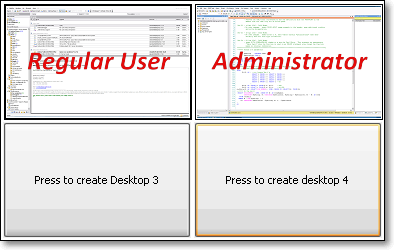
Desktops tray panel

Desktops control panel
So far we have solved our main issues:
- SSMS can be started normally, by double clicking its icon
- No credentials to type
- Drag & drop allowed from any window in this desktop
- SSMS opens the .sql files double clicked in this desktop
Sharing settings
We still have to find a way to share application settings between different windows accounts.
We spent hours and hours configuring SSMS with our favourite keyboard settings, templates and all the other things that make our lives easier: we don’t want to set up everything from scratch for our administrator user. Is there a way to share the same settings we set up for the regular user?
Of course there is, and, again, it comes from Sysinternals and it is named Junction.
Junction is a tool that allows creating symbolic links on the NTFS file system. The concept of symbolic links has been present for many years in UNIX operating systems: symlinks are anchors to files or folders residing on different paths in the file system, that are treated as if they were physical files or folders in the path they are linked in.
In order to share settings between two users, we could create a symbolic link from the administrator user’s profile folder to the regular user’s profile folder, as represented in this picture:
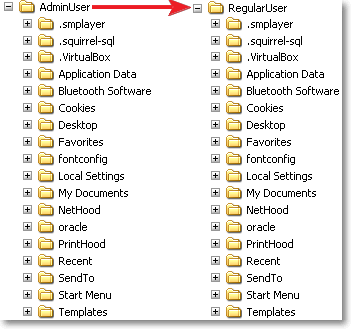
Unfortunately, the profile folder contains a special file, named NTUSER.dat (the user’s registry keys), that cannot be opened concurrently on a desktop operating system.
The only possible solution is linking each subfolder in the profile path:

A quick and easy way to accomplish this task is running this script:
Set fs = createObject(“Scripting.FileSystemObject”)
Set ws = createObject(“WScript.Shell”)

JunctionPath = “d:\Downloads\Junction\Junction.exe”

For each dir in fs.getFolder(“.”).subFolders
	DestPath = “..\AdminUser”
	If NOT Fs.folderExists(DestPath) Then
		Fs.createFolder(DestPath)
	End if
	If NOT Fs.folderExists(DestPath & “\” & dir.name) Then
		call ws.run(JunctionPath & “ “”” & DestPath & “\” & dir.name & “”” “”” & dir.path & “”””, 0, true)
	End if
Next
MsgBox “Profile linked successfully!”, vbInformation
Instructions:
- Copy the script code and save it as createJunction.vbs in the profile folder the links will point to (For instance, “c:\documents and settings\RegularUser”)
- Update “DestPath“ with the name of the user that will link the profile (For instance, “AdminUser”)
- Update “JunctionPath” with the path to Junction.exe
- Create a backup copy of the profile we will substitute with the links
- Delete all the folders in the admin profile, but keep all the files (especially NTUSER.dat)
- Go back to the folder where you saved the script and run it
For each subfolder in the regular user’s profile, the script will create a junction in the administrator user’s profile folder. This will not be directly visible from explorer: junctions are not different from real folders. Running DIR from the command prompt, instead, will reveal that we are dealing with something completely different:
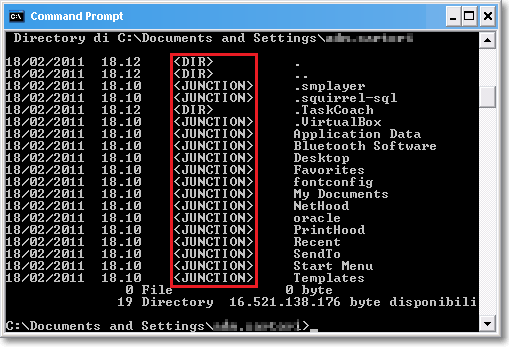
WARNING!! Symbolic links act exactly as normal folders: this means that deleting a folder that is instead a symbolic link, will delete the link’s target folder. In other words, deleting a file from AdminUser’s profile folder, will delete the file from RegularUser’s profile! Be careful!
What we achieved is a complete sharing of settings between our users. Going back to our original issue list:
- Settings are saved in the same path. Every change in the program settings will be automatically saved in the original profile.
- Open and save dialogs point to the same documents folder.
Mission accomplished!
However, registry settings will not be shared. There is a tool (RegLN) that allows creating symbolic links in the registry, but, personally, I don’t feel like exploring this possibility, that I find a bit dangerous.
In the end, SSMS settings are saved in the profile folder, which we already have shared. This is enough for me.
RESOURCES:
Oracle BUG: UNPIVOT returns wrong data for non-unpivoted columns
Some bugs in Oracle’s code are really surprising. Whenever I run into this kind of issue, I can’t help but wonder how nobody else noticed it before.
Some days ago I was querying AWR data from DBA_HIST_SYSMETRIC_SUMMARY and I wanted to turn the columns AVERAGE, MAXVAL and MINVAL into rows, in order to fit this result set into a performance graphing application that expects input data formatted as {TimeStamp, SeriesName, Value}.
Columns to rows? A good match for UNPIVOT.
Oracle 11g introduced PIVOT and UNPIVOT operators to allow rows-to-columns and columns-to-rows transformations. Prior to 11g, this kind of transformation had to be coded with bulky CASE expressions (for PIVOT) or pesky UNION queries (for UNPIVOT). PIVOT and UNPIVOT allow developers to write more concise and readable statements, but I guess that not so many people have been using these features since their release, or they would have found this bug very soon.
Here is the statement I was trying to run:
WITH Metrics AS (
    SELECT to_date(to_char(BEGIN_TIME,'YYYY-MM-DD HH24'),'YYYY-MM-DD HH24') AS TS,
        AVG(AVERAGE) AS AVERAGE,
        MAX(MAXVAL) AS MAXVAL,
        MIN(MINVAL) AS MINVAL
    FROM DBA_HIST_SYSMETRIC_SUMMARY
    WHERE METRIC_NAME = 'Host CPU Utilization (%)'
    GROUP BY to_date(to_char(BEGIN_TIME,'YYYY-MM-DD HH24'),'YYYY-MM-DD HH24')
)
SELECT TS, aggregate, value
FROM Metrics
UNPIVOT (value FOR aggregate IN (AVERAGE, MAXVAL, MINVAL))
ORDER BY 1
The idea behind was to convert the date column into a string without the minute part, in order to convert it back to date and group by hour.
Surprisingly enough, this was the result:
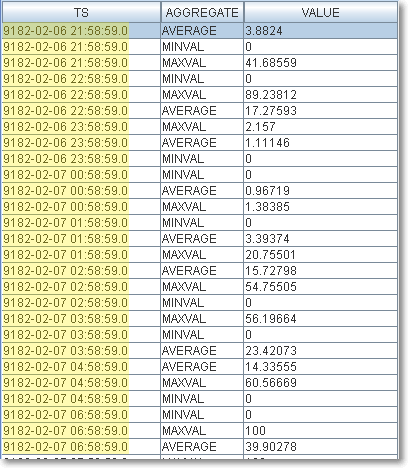
The date column was returned with wrong data. Why?
The issue seems to be related to the date datatype, because converting back to date after the UNPIVOT works just fine:
WITH Metrics AS (
    SELECT to_char(BEGIN_TIME,'YYYY-MM-DD HH24') AS TS,
        AVG(AVERAGE) AS AVERAGE,
        MAX(MAXVAL) AS MAXVAL,
        MIN(MINVAL) AS MINVAL
    FROM DBA_HIST_SYSMETRIC_SUMMARY
    WHERE METRIC_NAME = 'Host CPU Utilization (%)'
    GROUP BY to_char(BEGIN_TIME,'YYYY-MM-DD HH24')
)
SELECT to_date(TS,'YYYY-MM-DD HH24') AS TS, aggregate, value
FROM Metrics
UNPIVOT (value FOR aggregate IN (AVERAGE, MAXVAL, MINVAL))
ORDER BY 1
This query, instead, produces the expected results.

I raised this issue with Oracle Support who filed it under bug ID 9900850.8. Both 11.2.0.1 and 11.2.0.2 seem to be be affected by this problem, but it’s quite unlikely to see it fixed before 12.1.
Time will tell.
A short-circuiting edge case
Bart Duncan (blog) found a very strange edge case for short-circuiting and commented on my article on sqlservercentral.
In my opinion it should be considered a bug. BOL says it clearly:
Searched CASE expression:
- Evaluates, in the order specified, Boolean_expression for each WHEN clause.
- Returns result_expression of the first Boolean_expression that evaluates to TRUE.
- If no Boolean_expression evaluates to TRUE, the Database Engine returns the else_result_expression if an ELSE clause is specified, or a NULL value if no ELSE clause is specified.
What makes Bart’s example weird, is the fact that the ITVF seems to be the only scenario where the ELSE branch of the expression gets evaluated:
-- Autonomous T-SQL batch: everything runs just fine
DECLARE @input int
SELECT @input = 0
SELECT calculated_value =
    CASE
        WHEN @input <= 0 THEN 0
        ELSE LOG10 (@input)
    END
GO

-- Scalar function: runs fine
CREATE FUNCTION dbo.test_case_short_circuit2 (@input INT)
RETURNS int
AS BEGIN
RETURN (
    SELECT calculated_value =
        CASE
            WHEN @input <= 0 THEN 0
            ELSE LOG10 (@input)
        END
)
END
GO

SELECT dbo.test_case_short_circuit2 (-1);
GO
However, short-circuiting should never be something to rely upon: whenever there’s an alternative way to express the statement, I suggest using it.
2011/03/04 UPDATE:
Paul White (blog | twitter) agrees to consider this as a bug:
It is constant-folding at work. If you replace the literal constant zero with a variable, the problem no longer occurs. SQL Server expands the in-line TVF at optimization time and fully evaluates the CASE with the constant values available.
Constant-folding should never cause an error condition (such as an overflow) at compilation time – there have been other bugs in this area fixed for the same reason.
More details on the discussion thread of my article.


 spaghettidba